|
Note: This article contains information about UltiMaker 2.85 mm PPS CF material. Similar quality cannot be guaranteed with third-party filaments. This material can be used on the UltiMaker Factor Series, but is not compatible with any other UltiMaker or MakerBot printer.
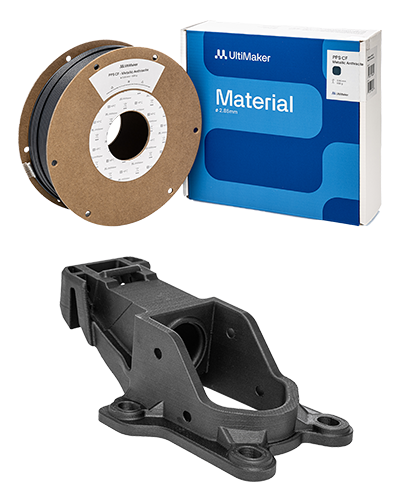
Ultimaker PPS CF is a carbon fiber-reinforced polyphenylene sulfide (PPS) filament and the next-level composite material for the UltiMaker Factor Series. It has excellent performance while still being easy to print using the HT print core. PPS CF prints reliably with great precision on the Factor 4 and Factor 4 Plus, yielding flame-retardant, temperature-resistant (> 230 °C), and chemical-resistant (insoluble in all solvents below 200 °C) parts. It has great strength and stiffness with next-level durability. Replace metal and PEEK parts with a cost-effective and easy-to-manufacture solution.
PPS CF is available in a single color: Metallic Anthracite.
|  |
In this article:
- Compatibility: Information about printer, print core, and dual material compatibility
- Printing recommendations: Overview of the advised temperatures, adhesion, and environment
- Maintenance and troubleshooting: Advice for printer maintenance and material storage
- Health and safety: Important information about printing safely with UltiMaker PPS CF
|
Related articles for UltiMaker PPS CF:
|
Compatibility
UltiMaker PPS CF can be printed on the UltiMaker Factor Series using an abrasion-resistant and high-temperature print core.
| Printer | Compatible print core |
|---|
| UltiMaker Factor 4+ | CC+ 0.6, HT 0.6 (experimental) |
| UltiMaker Factor 4 | HT 0.6 |
Printer and print core compatibility notes
- UltiMaker PPS CF has optimized settings for the UltiMaker Factor Series printers. This ensures a good end-of-filament and end-of-print experience and an optimal build environment. Please make sure to use the latest version of UltiMaker Cura and keep the printer's firmware up to date.
- On Factor 4, PPS CF is printed using the HT 0.6 print core. On Factor 4+, this profile is available experimentally; the CC+ 0.6 print core is preferred on this model.
- PPS CF needs a controlled environment to print reliably and is therefore not supported on UltiMaker S Series, even though these printers are abrasion-resistant.
- UltiMaker PPS CF is not supported on the UltiMaker 2(+) series, UltiMaker 3 series, or Original(+). These printers are not abrasion-resistant; components such as the feeders and nozzles will wear at an excessive rate when used with composite materials.
Dual material combinations
PPS CF can also be used for dual-extrusion prints with support materials, in combination with PVA (water-soluble) or PETG (easy to remove). Below you can find the complete dual-material compatibility overview for PPS CF.
Support materials:
- PVA (experimental)
- PETG
- Self-support (PPS CF)
Note: UltiMaker PPS CF is not compatible with Breakaway. PVA is experimental, as this may cause jamming issues with some prints, and PVA must be loaded into extruder 1. PVA reliability was improved in Cura 5.8.1.
Dual material combinations have not been verified, since limited use cases are available. Printing PPS CF in combination with TPU 95A is possible but experimental, because of the potential oozing of TPU 95A in dual prints. Make sure to pre-dry your TPU 95A for better results.
Printing recommendations
PPS CF is an advanced material. Engineering materials offer advanced properties but may require more printing experience to achieve consistent results, even when using default settings.
Tip: Always use the latest version of UltiMaker Cura and make sure that your 3D printer is updated with the latest firmware version to include the correct material profile for UltiMaker PPS CF. Profiles for PPS CF are included in UltiMaker Cura 5.7.1 and higher.
Cura profiles
UltiMaker PPS CF supports intent print profiles. The Engineering profile is optimized for dimensional accuracy, and the Balanced profile offers a good compromise of all settings. PPS CF also has an Annealing profile for when the print will be post-processed. This profile retains the dimensional accuracy of the printed part after annealing and improves strength, stiffness, and thermal resistance.
Note: No Visual intent profiles are available for PPS CF, as this is intended as an engineering material.

Temperatures
UltiMaker PPS CF prints at a nozzle temperature of 320 °C. The build plate temperature is set to 80 °C for reliable adhesion and good release from the flexible build plate. The build volume temperature target is 50 °C.
The temperatures are the same for all available profiles for Factor Series and are automatically set correctly.
Adhesion
No glue is required to print on the flexible build plate of the UltiMaker Factor Series printers. However, for multiple complex objects on the build plate, the use of Magigoo HT on the flexible build plate can improve adhesion.
Caution: The use of Magigoo HT on the build plate can result in over-adhesion, making it more difficult to remove objects and potentially damaging the printed part.
In UltiMaker Cura, the default build plate adhesion method for all PPS CF profiles is a brim. A brim is made of extra lines printed around the perimeter of the initial layer of your 3D print to ensure successful adhesion to the build plate, even for larger models.
After printing, let the build plate cool down completely before removing the flexible build plate from the printer. Bend the plate to release the printed part.
Print environment
PPS CF does not require additional accessories to create a stable printing environment. Factor Series printers have a well-insulated build chamber and optimized air control settings. Always keep the door closed during printing to prevent any external influences on the print.
Annealing
Annealing means the treatment of a 3D printed part in an oven. For UltiMaker PPS CF, annealing will improve its mechanical properties and its heat resistance. UltiMaker Cura has a specialized annealing intent profile with the best settings that ensure dimensional accuracy remains intact.
Tip: Find more information about annealing on this page.
Optimize Z strength
Due to the fiber orientation, the strength and stiffness of the printed object are the highest in the XY and YZ planes. Therefore, it is important to take the orientation of the part into account during the design and/or slicing process.
Tip: More tips and tricks to improve Z strength can be found on this page.
Maintenance and troubleshooting
For the best results with UltiMaker PET CF (as with any material), apply general maintenance to your UltiMaker printer(s). Find the recommended preventive maintenance schedule for your Factor 4 or Factor 4 Plus here: Factor Series - Maintenance schedule
Specific maintenance tips
- Clean the print core: Regularly clean the inside of the print cores using the hot and cold pull process. For the HT and CC+ cores, this is recommended fairly frequently, about every 100 printing hours. This prevents buildup of fibers from composite materials.
- Check the nozzle cover: Because PPS CF uses a high nozzle temperature, this increases the wear on the nozzle cover. Regularly check the nozzle cover for signs of wear and replace it if needed. Printing with a damaged or missing nozzle cover can cause temperature inconsistencies or errors, or lead to print failures, which may also damage your printer (such as a flooded print head).
- Clean the nozzle tips: Also, ensure to keep the nozzle tips clean on the outside. Manually heat up the print core and use tweezers to pluck away any material stuck to the outer surface of the nozzle. This improves bed leveling reliability and extends the lifespan of the silicone nozzle cover.
Dry the material
PPS CF is packaged with a low moisture content to ensure a good out-of-the-box experience. However, when the filament is subjected to moisture, the filament should be dried at 80 °C for 16 hours. This greatly improves mechanical properties, dimensional accuracy, and surface quality. Wet filament will result in increased porosity and inferior visual quality in prints and a crackling sound while printing.
Tip: Learn more about drying materials in this article. For the best results with UltiMaker PPS CF, pre-dry the material before use.
Load the material
For a reliable loading process, ensure the filament has a clean, pointy tip. Use cutting pliers or wire cutters to remove any bent or damaged sections from the end of the spool, then cut the filament at an angle. A double cut will create a sharp tip that feeds smoothly.
Tip: Sharpen the tip of the filament with a pencil sharpener for the most consistent and reliable results.
Health and safety
UltiMaker PPS CF emits low levels of gases and particles when 3D printed in accordance with the recommended temperatures mentioned above. External emission tests have been performed and demonstrated that UltiMaker PPS CF, in combination with UltiMaker Factor 4, meets the UL2904 guidelines. To ensure a comfortable and healthy working environment, we always recommend 3D printing in a well-ventilated area.
Tip: For more information, download the safety data sheet for UltiMaker PPS CF here.
Caution: PPS CF uses high nozzle and build plate temperatures. Never reach inside the printer while it is in operation, and never touch heated components.
The Factor Series printers include clear visual indicators to show when it is safe to touch:
- Build plate: When the build plate temperature is above 60 °C, an orange warning bar appears at the top of the display. The bar disappears once the build plate cools to a safe temperature. Keep in mind that 60 °C can still feel warm to the touch, so handle the build plate with care.
- Print cores: The print core status is indicated by the LEDs behind the cores. When a print job is not in progress but a print core is still hot (heating up or cooling down), the LED glows or pulses orange. When it turns blue, the print core has cooled and is safe to handle.


