Why is it important to dry materials?
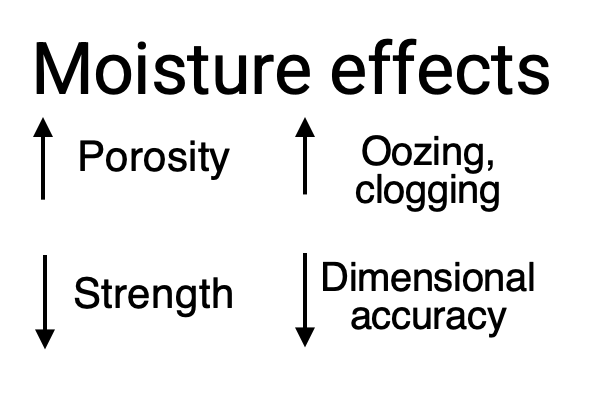
To have optimal print quality, dimensional accuracy and mechanical properties, filaments should be as dry as possible. When filaments absorb moisture, print quality decreases, leading to inferior surface quality (e.g. stringing) and reduced mechanical properties of the 3D printed part.
How do I know if my filament is dry?
In extreme cases, you might even hear the filament "popping" when it is being extruded. However, also at lower moisture levels, the impact on your printed part may be huge even though it is not immediately visible.
Visible signs of moisture differ per material:
- Milky appearance, bubbles: Nylon (transparant), PVA
- Stringing/oozing: TPU95A, Nylon, Nylon CF Slide, PVA, to lesser extent PETG, CPE and PET CF
- Voids/blobs and dimensional accuracy issues: composite materials such as PET CF and PPS CF
- Degradation, risk of clogging: PVA, Nylon, to lesser extent TPU95A
To have absolute certainty, you can measure the moisture level using a specialized apparatus, such as the Precisa Moisture Analyzer. The complete instructions can be found here.
If you do not have access to such instruments, the easiest ways to ensure your filament is properly dry are:
- To dry your filament according to the procedure below.
- To always store the material properly when not in use.
How to dry my filament?
To dry filaments, elevated temperatures are required. Thus, storing the material with the silica desiccant in the packaging, or storing it in the Material Station, does not dry the material.
The best way: a dedicated drying apparatus
The best results are obtained with a dedicated apparatus that keeps the filament actively at a set temperature for a set period of time, while controlling humidity to a low level. At UltiMaker, our engineers use the PrintDry, but other products are on the market that do the same. Note that products such as the PolyBox only keep the material dry but do not actively dry it.
The next best: use your heated build plate
If you do not have access to dedicated drying equipment, it is also possible to dry your filament on the build plate of your UltiMaker 3D printer. Naturally, the humidity is not controlled, so it typically takes a bit longer and higher temperatures are required to dry your filament. Also, the process is less controlled than in e.g. a PrintDry.
Drying temperature and time
It is important to dry your material at the optimal conditions for each polymer type. As a rule of thumb, materials should be dried below the glass transition temperature (Tg) of a material, to prevent crystallization or softening of the material, which could cause the filament to stick together. Also, the UltiMaker material spools are made of a polypropylene copolymer that can soften around 80 °C. When drying a complete spool, it is important to stay below this temperature.
The table below outlines the recommended drying temperature for each of the UltiMaker materials.
| | Temperature PrintDry | Temperature build plate | Drying time (Print Dry) | Drying time (build plate) |
|---|
| PLA | 40 °C | 50 °C | 4 - 8 hrs | 4 - 8 hrs |
|---|
| Tough PLA | 40 °C | 50 °C | 4 - 8 hrs | 4 - 8 hrs |
|---|
| Breakaway | 40 °C | 50 °C | 4 - 8 hrs | 4 - 8 hrs |
|---|
| Nylon | 50 °C | 60 °C | 24+ hrs | 24+ hrs |
|---|
| PVA | 50 °C | 55 °C | 10 - 20 hrs | 10 - 20 hrs |
|---|
| PETG | 65 °C | 70 °C | 4 - 8 hrs | 10 - 20 hrs |
|---|
| CPE | 65 °C | 70 °C | 4 - 8 hrs | 10 - 20 hrs |
|---|
| TPU95A | 70 °C | 70 °C | 4 - 16 hrs | 10 - 20 hrs |
|---|
| PET CF | 70°C | 70°C | 4 - 16 hrs | 10 - 20 hrs |
|---|
| CPE+ | 80 °C (or highest available temperature) | 80 °C | 4 - 8 hrs | 10 - 20 hrs |
|---|
| PC | 80 °C (or highest available temperature) | 80 °C | 4 - 8 hrs | 10 - 20 hrs |
|---|
| ABS | 80 °C (or highest available temperature) | 80 °C | 4 - 8 hrs | 10 - 20 hrs |
|---|
| PPS CF | 80 °C | 80 °C | 4 - 16 hrs | 10 - 20 hrs |
|---|
| Nylon CF Slide | 80 °C | 80 °C | 8 - 16 hrs | 10 - 20 hrs |
|---|
| PP | Not needed | Not needed | N/A | N/A |
|---|
For most filaments, it is sufficient to dry the spool for 4 - 8 hours. Moisture-sensitive filaments such as Nylon, Nylon CF Slide, PVA, and TPU95A that contain a lot of moisture should be dried overnight (for 10 - 20 hours or even several days for wet Nylon). If drying on the build plate, for those filaments that require higher temperatures, also 10 - 20 hours is recommended.
How to keep my filament dry?
There are several ways to store the filament in such a way that it stays dry once properly dried.
Tip: For more information on optimal drying conditions of third-party materials, please take a look at the technical data sheets or printing guidelines, e.g. on the UltiMaker Marketplace.


