With composite materials, there is a very high anisotropy in part performance. It is therefore important to properly orient your part. Since the UltiMaker composite materials have multiple support options, it is recommended to think carefully about orienting your part.
It is important to make sure that the load is where the lines are deposited. Avoid also loading the part in the Z direction, as this typically has mechanical properties in the range of unreinforced polymers.
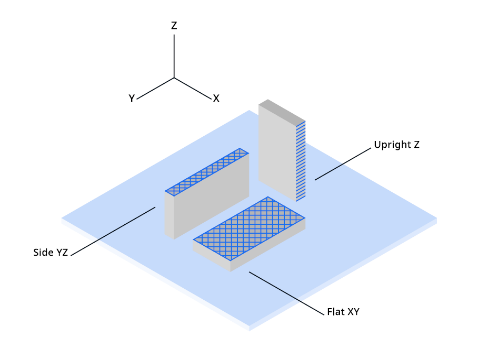
Tip: Avoid issues by orienting the model such that the highest mechanical forces are applied to the XY plane.
Other recommendations for optimised Z strength:
|
Design guidelines
|
Design your 3D model for best performance. Wall thickness min. 2 mm, preferred 4 mm or more. See also the model design guidelines for tips on how to improve your part with e.g. adding ribs or gussets.
|
|---|
|
Air circulation
|
Avoid strong external air circulation (such as ventilation or air conditioning) and cold environments.
|
|---|
|
Infill flow
|
In UltiMaker Cura, set Infill flow to 100%.
Note: This reduces the dimensional accuracy somewhat.
|
|---|
|
Print temperature
|
Layer bonding can be improved by increasing the print temperature with 10°C.
Note: This reduces the aesthetics and overhang quality somewhat.
|
|---|
|
Print sequence
| When printing multiple models with single extrusion, in UltiMaker Cura, set the Print Sequence to One at a Time. The second extruder must be disabled for this setting to be visible.
Note: This is only possible for models with a maximum height (Z) smaller than the printer's gantry height. This is 55 mm for Factor 4 printers.
|
|---|


