A print profile consists of the complete list of print settings and the parameters set, which form the 3D printing strategy. There are preset profiles in UltiMaker Cura to take away the effort of fine-tuning all available Cura settings. The active profile is shown in the Print settings panel on the right side of the UltiMaker Cura interface.
The desired result of a printing profile depends on the intent of the application. Some printed objects require high visual quality, while for others the mechanical properties are more important. For this reason, UltiMaker's Print Process engineers have created intent profiles based on specific applications. Every intent is detailed below, showing the compatible configurations, example applications, and the concessions per printing profile.
Note: Intent profiles are developed for UltiMaker S and Factor Series printers. The profiles often include improvements in new Cura releases, such as for quality, efficiency, and/or reliability. It is always recommended to use the latest version of Cura.
Tip: The availability of the different intent profiles depends on the printer model, the material selected, and the print core type (and nozzle size) used. For example, no intent profiles are developed for the AA 0.25 print core, as this is only meant for high detail. The selection of profiles for certain materials may differ between printer models. See Cura for the most up-to-date availability.
Configuration visibility
Intent profiles are tested thoroughly. To ensure reliable print quality, not all profiles are available to all printers and their configurations. Not all UltiMaker printers will support intent profiles. Time is needed for the print profile engineers to thoroughly test all machines and materials.
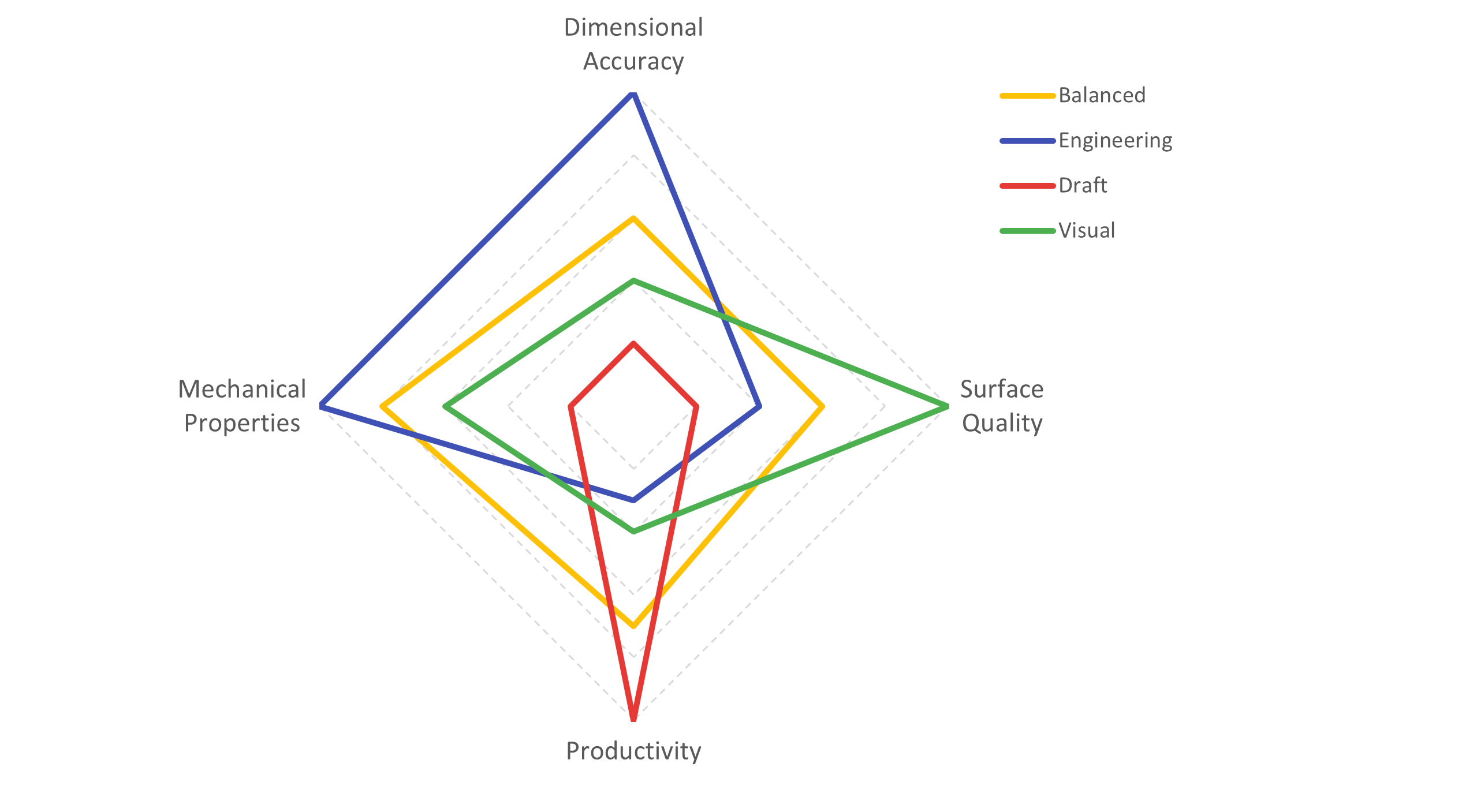
This image shows an indication of the surface quality, productivity, mechanical properties, and dimensional accuracy per printing profile.
Note: The annealing profile is not shown in this overview. This is available for selected machines and composite materials (such as PPS CF and PET CF) and mainly offers scaling benefits. Learn more about this intent profile at the bottom of this article.
The default profile offers a good balance of properties, which works for most general applications. If your needs are more specific, choose one of the intent profiles. The currently available profiles can be found below per intent profile type. Intent profiles are shown as long as the active extruder is compatible.
Visual quality
The visual profile is designed to print visual prototypes and models with the intent of high visual and surface quality.
Profile properties
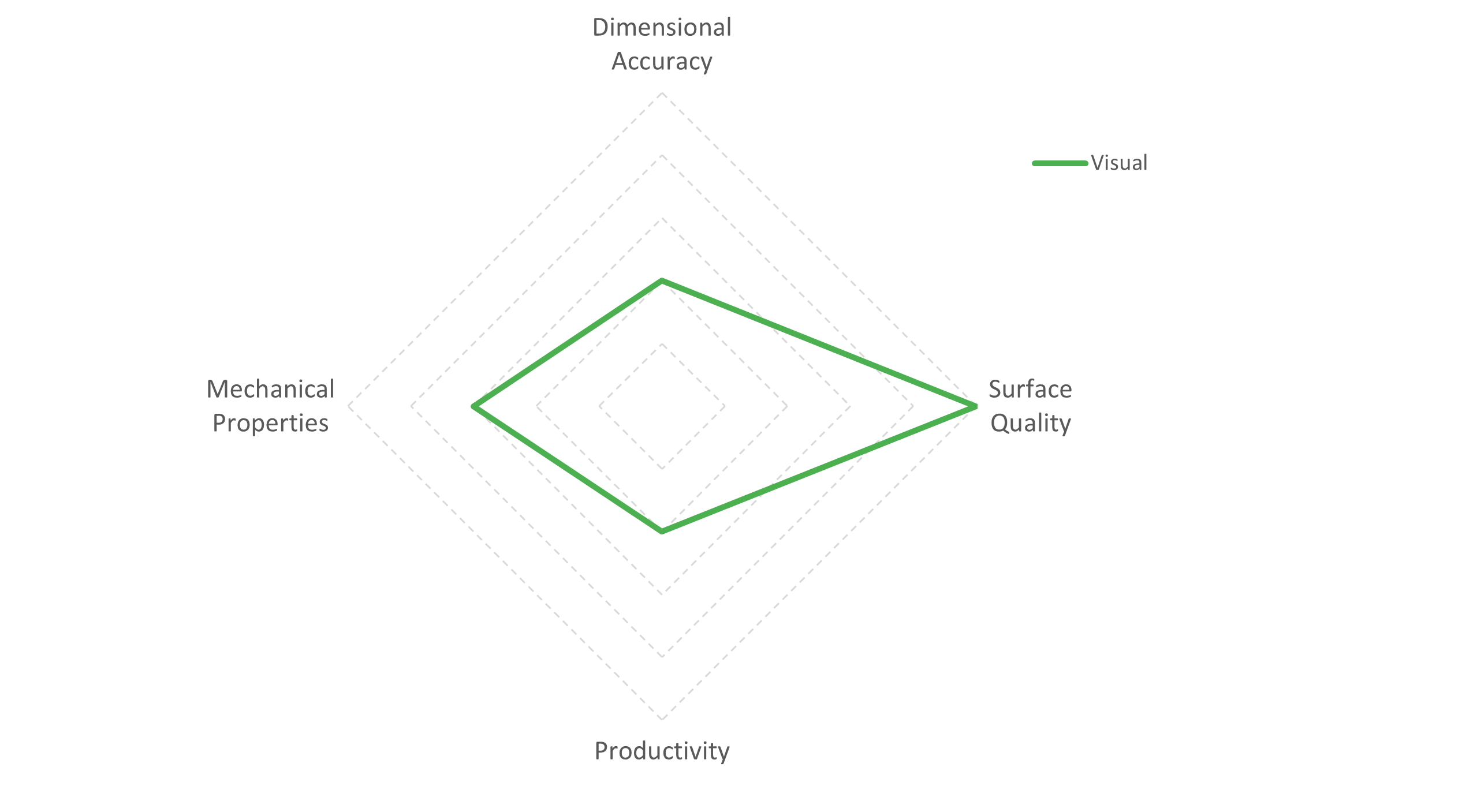
The visual profile produces extremely high surface quality prints. As a concession, the mechanical properties are average, and the dimensional accuracy of the printed parts is low. The object is printed more slowly to increase the visual appearance.
Applications
The visual profile is best used for visual prototypes and end-use models. A few examples are:
- Architecture. Print visually appealing 3D models for client presentations.
- Visual concept modeling. Print aesthetically pleasing models to show off visual concepts.
- Product development. Print usable 3D models without the need for post-processing.
Configuration compatibility
The Visual intent profiles are mainly for the 'general purpose' materials. Engineering materials, such as Nylon, PC, or CPE, are not expected to be used for visual applications, but are rather selected for their specific material properties. Most engineering filaments do not have Visual intent profiles available.
Engineering
The engineering profile is designed to print functional prototypes and end-use parts with the intent of better accuracy and closer tolerances.
Profile properties
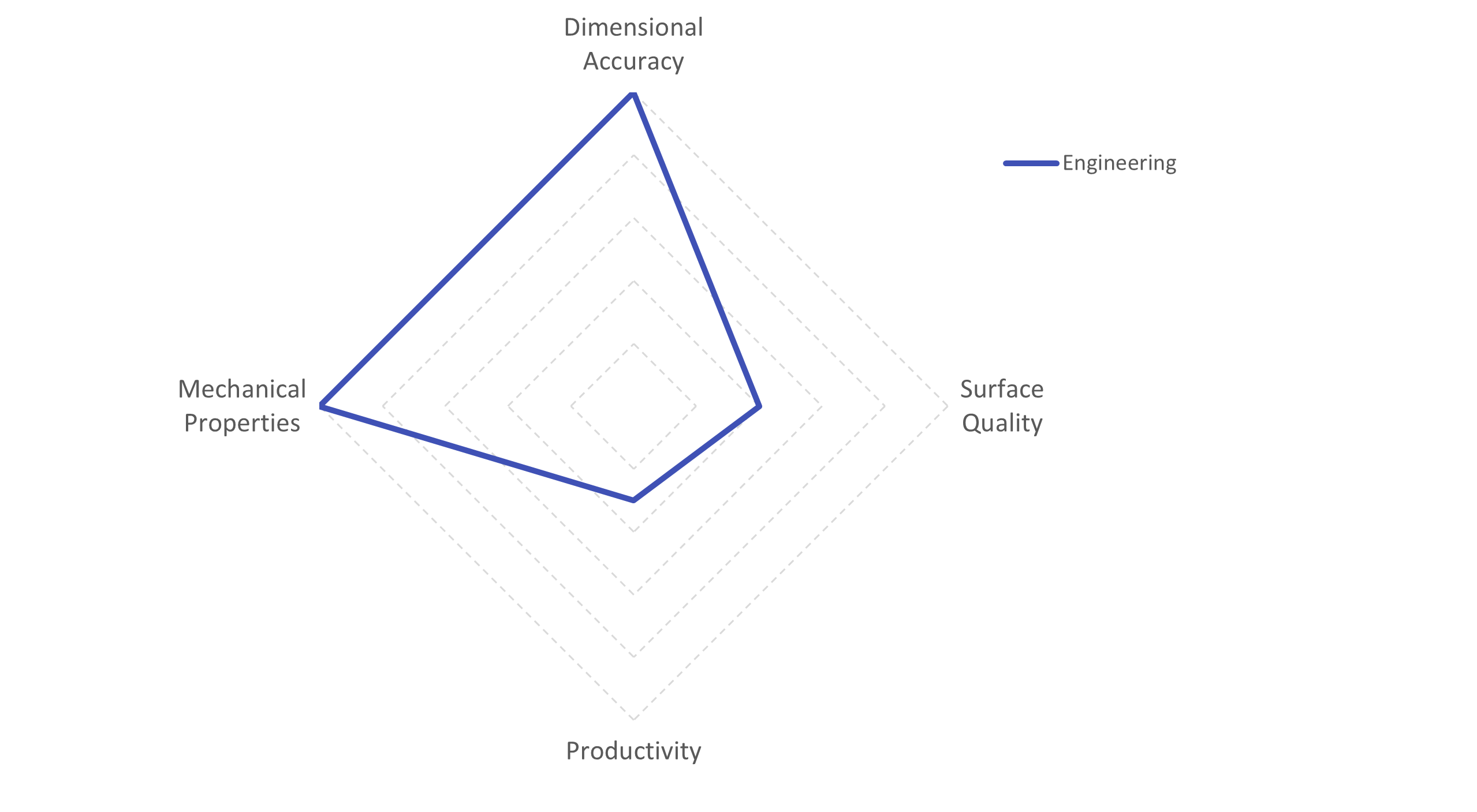
The engineering profile produces prints with improved dimensional accuracy and mechanical properties. For example, the engineering profile also significantly improves printing internal holes and geometries. As a concession, the print speed and the visual quality of the printed parts are average.
Applications
The engineering profile is best used for functional prototypes and mechanical end-use parts. A few examples are:
- Automotive. Print high-precision tooling with minimal tolerance.
- Spare parts. Print high-precision models to fit the existing parts.
- Tools, jigs, and fixtures. Print high-precision models to reduce tolerances in production lines.
Configuration compatibility
As dimensional accuracy is important for many applications and materials, the engineering profiles are available for almost all UltiMaker materials on S and Factor Series printers. This is not limited to engineering-grade filaments, but also includes materials that are less commonly used for engineering applications such as PLA and Tough PLA.
Note: On the high-speed S Series (S6 and S8) and Factor Series, the engineering profiles are mostly limited to a 0.2 mm layer resolution. This ensures the highest accuracy combined with mechanical properties.
Draft
The draft profile is designed to print initial prototypes and concept validation with the intent of significant print time reduction.
Profile properties
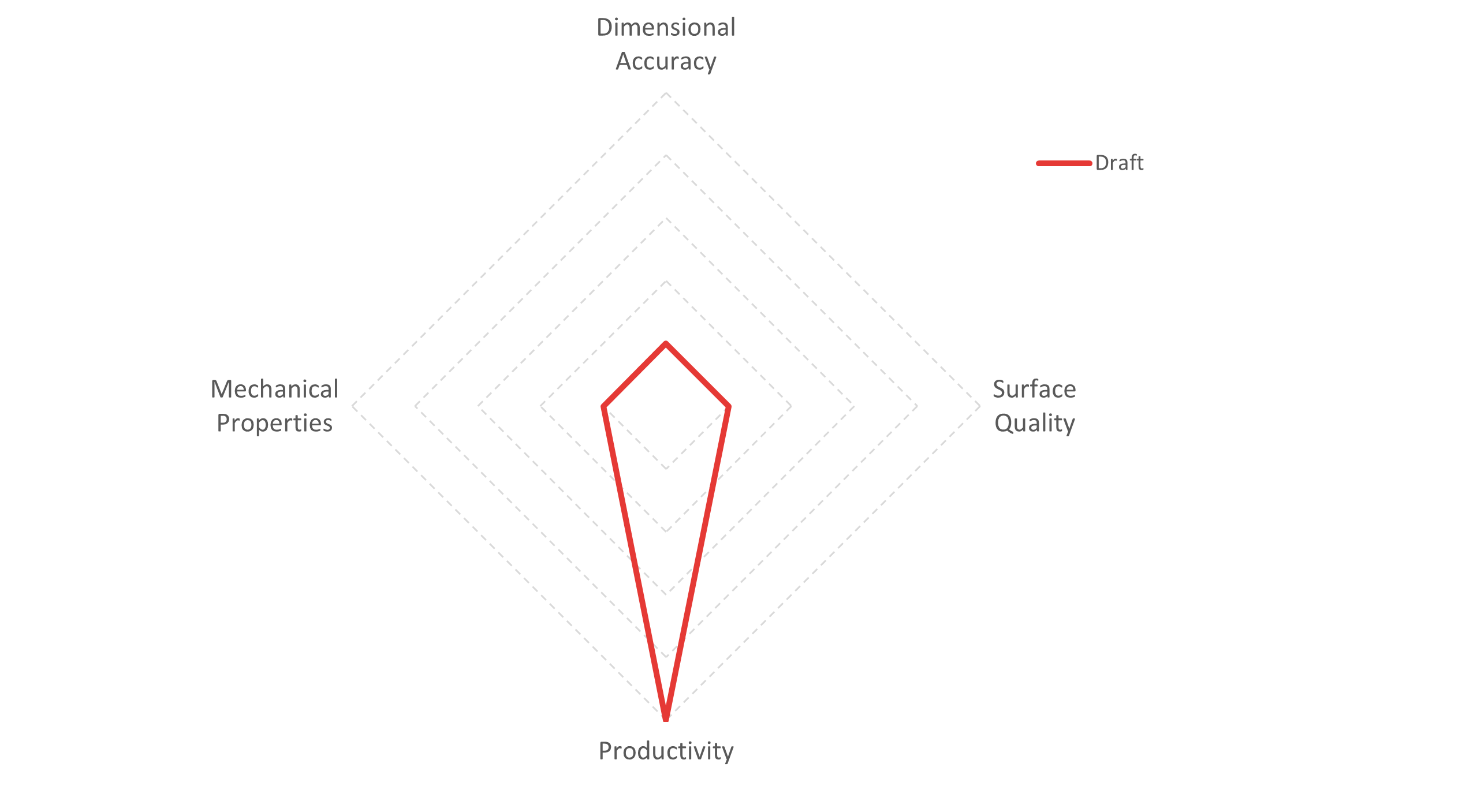
The draft profile produces prints at high speeds to greatly improve productivity. The profile allows a higher output per printer. As concessions, the visual quality, mechanical properties, and dimensional accuracy are low.
Applications
The draft profile is best used for initial prototypes and concept validation. A few examples are:
- Product design. Rapidly print 3D model iterations in sequence.
- Small batch production. Print models fast to keep productivity at a maximum.
Configuration compatibility
The draft intent profile is available for the UltiMaker S and Factor Series printers and most UltiMaker materials. Draft profiles have layer resolutions of 0.2 mm or higher.
Balanced
The balanced profile is designed as a good compromise between engineering, visual, and draft intents. Before Cura 5.5 this profile was called default.
Profile properties
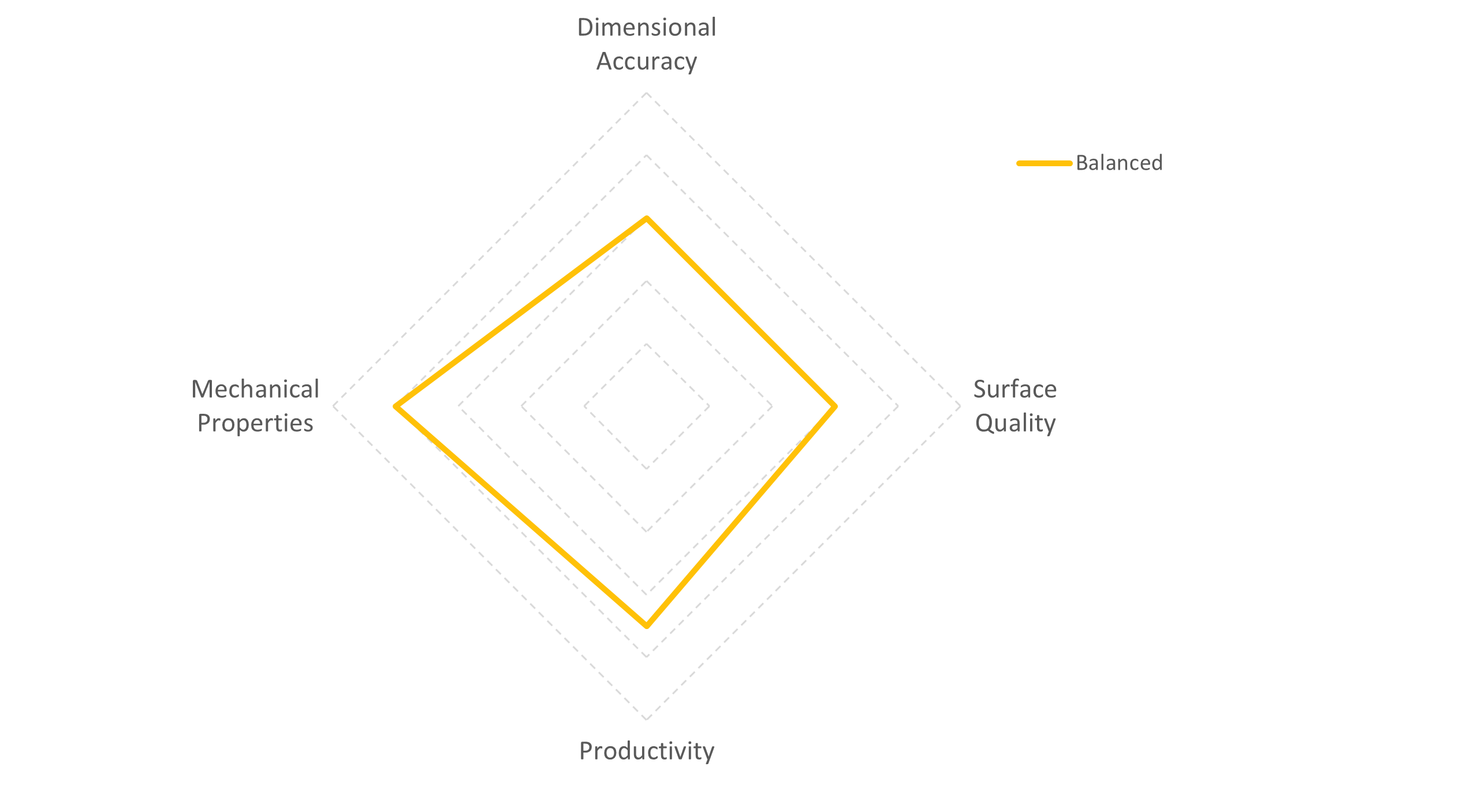
The balanced profile produces prints with good mechanical properties and dimensional accuracy and a good surface finish, at a moderate speed.
 Applications
The balanced profile is best used for parts that do not have a clear need for any of the other available intents. It is a good general-purpose profile for most use cases.
Configuration compatibility
The balanced intent is the default profile and is available for the UltiMaker S and Factor Series printers for all materials.
Annealing
There is one more intent profile, which has been developed specifically for UltiMaker composite materials, such as PET CF and PPS CF. Composite material prints may benefit from annealing, as this process increases the object's stiffness, strength, and temperature resistance. Learn more about annealing on these pages: UltiMaker PET CF annealing and UltiMaker PPS CF annealing.
The annealing profiles automatically scale your model to compensate for average shrinkage during the annealing process.
These profiles are available for the UltiMaker S and Factor Series for UltiMaker PET CF, and exclusively on Factor Series for PPS CF.


