|
Note: This article contains information about UltiMaker 2.85 mm Nylon CF Slide material. Similar quality cannot be guaranteed with third-party filaments. This material can be used on the UltiMaker S and Factor Series, but is not compatible with older-generation UltiMaker printers, Method, Sketch, or Replicator.
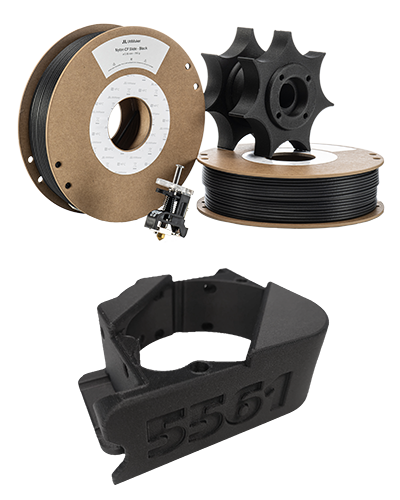
Engineered for industrial applications where tribological performance is needed, Nylon CF Slide is a Nylon 612 CF copolymer offering wear resistance, temperature stability up to 180 °C, and PFAS-free performance.
UltiMaker Nylon CF Slide has optimized settings for the UltiMaker S and Factor Series. This ensures a good end-of-filament and end-of-print experience and an optimal build environment. Please make sure to use the latest version of UltiMaker Cura and keep the printer's firmware up to date.
Nylon CF Slide is only available as black filament.
|  |
In this article:
- Compatibility: Information about printer, print core, and dual material compatibility
- Before you start: Important tips and best practices before you start printing
- Printing recommendations: Overview of the advised temperatures, adhesion, and orientations
- Maintenance and troubleshooting: Advice for printer maintenance and material storage
- Health and safety: Important information about printing safely with Nylon CF Slide
|
Related articles for Nylon CF Slide:
|
Compatibility
UltiMaker Nylon CF Slide can be printed on the UltiMaker S Series and Factor 4 using the abrasion-resistant and high-temperature CC and HT print cores.
| Printer | Compatible print core |
|---|
| UltiMaker Factor 4+ | CC+ 0.6, CC 0.4 (experimental), CC 0.6 (experimental), HT 0.6 (experimental) |
| UltiMaker Factor 4 | CC 0.4, CC 0.6, HT 0.6 |
| UltiMaker S6 and S8 | CC+ 0.6, CC 0.4 (experimental), CC 0.6 (experimental) |
| UltiMaker S3, S5, and S7 | CC 0.4, CC 0.6 |
Printer and print core compatibility notes
- UltiMaker Nylon CF Slide is a composite material and is not compatible with the UltiMaker 2 and 3 series, as these printers are not abrasion-resistant (particularly the feeders). This material also cannot be used with the Method, Sketch, or Replicator series.
- Similar to the above, UltiMaker Nylon CF Slide needs an abrasion-resistant print core (CC variants or HT) to print reliably on UltiMaker S and Factor Series. Using different print cores, such as an AA variant, will lead to rapid wear of the print core. This may cause print failures or additional damage to your printer.
- For the CC print cores: The CC 0.6 size is recommended for most use cases. CC 0.4 print cores can be used for smaller objects or designs with text or tiny features, but make sure to regularly clean the print core to avoid clogging and under-extrusion.
- For the high-speed printers running the Cheetah motion planner (UltiMaker S6, S8, and Factor 4+), the CC+ 0.6 print core is preferred; profiles for the standard CC print cores (and HT for Factor 4+) are experimental.
- On the UltiMaker S6 and S8, the CC+ 0.4 is still available in Cura. However, this print core was replaced by the CC+ 0.6 due to reliability concerns.
- Ensure that the printer's firmware is up to date so the material profile is available on the printer. The UltiMaker S6, S8, and Factor 4+ were launched with Nylon CF Slide compatibility, but the profile for this material was later added for older S Series (firmware 9.0.3) and Factor 4 (firmware 10.1.4).
Dual material combinations
Nylon CF Slide is exclusively compatible with dual-extrusion UltiMaker printers (Factor and S Series), and this material can also be printed in combination with support materials or other build materials. See the overviews below:
|
Support materials:
- PVA
- Breakaway
- Self-support (Nylon CF Slide)
|
Dual combinations:
- Nylon
- PLA (experimental)
- TPU 95A (experimental)
|
For the support materials, PVA is water-soluble, and Breakaway is easy to remove from the model. It is also possible to use Nylon CF Slide as a support material for single-extrusion prints.
The experimental and not supported combinations have not been verified, since limited use cases are available. Printing Nylon CF Slide in combination with TPU 95A is listed as experimental because of the potential oozing of TPU 95A in dual prints. Make sure to pre-dry your TPU 95A for good results.
Before you start
This section contains some tips and best practices before you start printing to ensure optimal reliability.
Material profiles
To print successfully with Nylon CF Slide, it is important that you have the correct profiles. This requires the latest software and firmware.
Software (UltiMaker Cura)
The profiles for Nylon CF Slide are included in UltiMaker Cura (desktop) 5.10 and higher. It is always recommended to use the latest version of this software for the best results. Download and update Cura from the UltiMaker website. To use the profiles, make sure you have selected a compatible printer and print core (see above).
Firmware
The printers compatible with Nylon CF Slide need the profile installed on the printer; this is done in the firmware. See the list below of the minimum firmware versions that support this material:
- UltiMaker S6 and S8: These printers were launched with the Nylon CF Slide profile. The minimum firmware versions are 11.0.0 for S8 and 11.1.0 for S6.
- UltiMaker S3, S5, and S7: The profile for Nylon CF Slide was added in 9.0.3.
- Factor 4: The profile for Nylon CF Slide was added in 10.1.4.
- Factor 4+: This printer was launched with the Nylon CF Slide profile included. The minimum firmware version for this printer is 11.2.1.
For older firmware versions, you can add the Nylon CF Slide material profile to your printer manually:
- Download this .umm file and save it to a USB stick.
- Insert the USB into your printer.
- In the Options menu (gear icon), go to Maintenance → Import material profiles.
- Select Import from USB to save the profile to your printer.
Note: It is always recommended to keep your printer's firmware up to date (Latest or Stable). All listed minimum versions are or were available on the Stable channel.
Drying the material
Nylon CF Slide is packaged with a low moisture content to ensure a good out-of-the-box experience. However, for optimal results, drying the material before use is advised.
When the filament is subjected to moisture, the filament should be dried at 80 °C for 16 hours. This greatly improves mechanical properties, dimensional accuracy, and surface quality. Wet filament will result in increased oozing, porosity, and inferior visual and mechanical quality in prints. Store the spools at low humidity (< 10% RH) when not in use and dry the spool again after 4-7 days in the Material Station.
Tip: Visit this page for more information about drying materials.
Loading the filament
For a reliable loading process, especially when using the Material Station, ensure the filament has a clean, pointy tip. Use cutting pliers or wire cutters to remove any bent or damaged sections from the end of the spool, then cut the filament at an angle. A double cut will create a sharp tip that feeds smoothly.
Tip: For the best results, a pencil sharpener can also be used to shape the filament tip.
When using the S series Material Station, it is recommended to load composite materials through the straightest possible extrusion path. For print core 1, use bay A first (then B, C, etc.). For print core 2, use bay F first (then E, D, etc.). This minimizes friction during print preparation, when the filament is forwarded from the Material Station to the print head. This is not so relevant for Factor Series, due to the different merger shape used in the Material Station.
Printing recommendations
Printing with Nylon CF Slide is simple and reliable when using the default profiles available in UltiMaker Cura.
Tip: As mentioned above, always ensure to use the latest version of Cura to benefit from the latest profiles, and keep the firmware up to date so that your printer is properly equipped to print this material.
Cura profiles
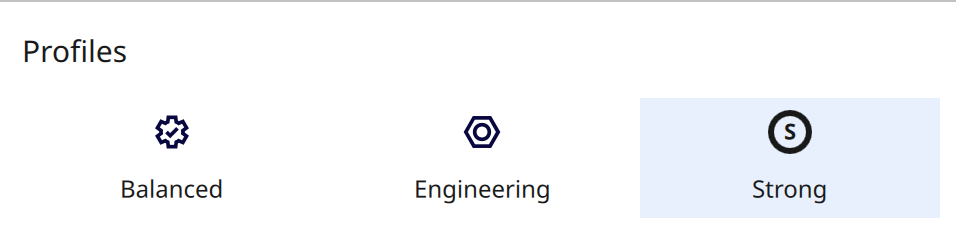
Nylon CF Slide supports intent print profiles. UltiMaker S series printers offer 'Balanced' and 'Engineering' profiles, where the engineering print profiles focus on enhanced dimensional accuracy. Additionally, a 'Strong' profile on the UltiMaker Factor Series printers results in exceptional Z strength, exceeding a Z tensile strength of 40 MPa.
Tip: Follow the annealing Nylon CF Slide instructions that result in strong, temperature-resistant, and dimensionally accurate parts.
Temperatures
UltiMaker Nylon CF Slide prints at a nozzle temperature of 280–300 °C, depending on the printer type and print profile. The build plate temperature is set to 70 °C for reliable adhesion and good release from the build plate. This temperature is used for both the glass and the flexible build plate.
Tip: The temperatures are automatically set correctly based on the printer, nozzle size, and profile you select in UltiMaker Cura.
Adhesion
No glue is required to print on the flexible build plate of the UltiMaker S and Factor Series. However, for multiple complex objects on the build plate, the use of Magigoo PA (Nylon) on the flexible build plate can improve adhesion. On the glass build plate, the use of glue is recommended, in particular Magigoo PA.
In UltiMaker Cura, the build plate adhesion method can be set to a brim. A brim is made of extra lines printed around the perimeter of the initial layer of your 3D print to ensure successful adhesion to the build plate, even for larger models.
Annealing
Annealing means the treatment of a 3D printed part in an oven. For UltiMaker Nylon CF Slide, annealing will improve its mechanical properties and its heat resistance. Note that the annealing process will cause the printed part to shrink slightly, so ensure to take this into account when designing or slicing the part.
Tip: Read more information about annealing on this page.
Orientation (Optimize Z strength)
Due to the fiber orientation, the strength and stiffness of the printed object are the highest in the XY and YZ planes. Therefore, it is important to take the orientation of the part into account during the design and/or slicing process. For Factor 4, UltiMaker Nylon CF Slide comes with a specialized 'Strong' profile to achieve exceptional Z tensile strength of over 40 MPa.
Tip: More tips and tricks to improve Z strength can be found on this page.
Maintenance and troubleshooting
For the best results with UltiMaker Nylon CF Slide (as with any material), apply general maintenance to your UltiMaker printer(s). Find the recommended preventive maintenance schedule for your printer type here:
Regularly clean the inside of the print cores using the hot and cold pull process. For the CC and HT cores, this is recommended fairly frequently, about every 100 printing hours. This prevents buildups of fibers from composite materials.
Also, ensure to keep the nozzle tips clean on the outside. Manually heat up the print core and use tweezers to pluck away any material stuck to the outer surface of the nozzle. This improves bed leveling reliability and extends the lifespan of the silicone nozzle cover.
Because Nylon CF Slide uses high nozzle temperatures, this increases the wear on the nozzle cover. Regularly check the nozzle cover for signs of wear and replace it if needed. Printing with a damaged or missing nozzle cover can cause temperature inconsistencies or errors, or lead to print failures, which may also damage your printer (such as a flooded print head).
In case of extrusion or print quality issues, check if the filament is dry. If the material has absorbed moisture, you may hear popping noises as the filament extrudes. Excessive stringing and oozing can also be a sign of elevated moisture content. Dry the material in case of issues, or pre-dry the material preventively before use for the best results. Learn more about drying in this article.
Always ensure to properly store the spools when not in use. Place the spool in a resealable bag, in a cool and dry place, and out of direct sunlight. For Nylon CF Slide, < 10% RH is recommended. While the spools can be stored for several days inside the Material Station, the humidity in the chamber is generally higher (15–25%). Therefore, it is recommended to store the spools separately or regularly dry the material.
Health and safety
UltiMaker Nylon CF Slide emits low levels of Volatile Organic Substances (VOCs) when 3D printed in accordance with the recommended temperatures mentioned above.
External emission tests have been performed and demonstrated that UltiMaker Nylon CF Slide, in combination with UltiMaker S7, meets the UL2904 guidelines. However, ultrafine particle emissions are higher than with generic materials such as PLA. To ensure a comfortable and healthy working environment, we always recommend 3D printing Nylon CF Slide with local exhaust ventilation and in a well-ventilated area.
For the UltiMaker S5 and S6, install the optional Air Manager (add-on) when using the printer with Nylon CF Slide for improved air quality. Other compatible UltiMaker printers already have an integrated air management and filtration system.
Tip: For more information, download the safety data sheet for UltiMaker Nylon CF Slide here.


