Product notification
The information in this article applies to the Ultimaker 2 series (Ultimaker 2, 2 Go, and 2 Extended). These products have been discontinued and the end-of-service date has passed. The information on this page remains available, but is no longer supported.
|
A skipping or ticking feeder may occur when the feeder motor experiences too much friction whilst pushing material forward. You will be able to hear the feeder skip or tick back and will also notice that the material is not moving forward or falls back a bit every time you hear the ticking sound. If you do nothing about this, your material will eventually flatten, as the knurled wheel of the feeder keeps moving over the same piece of material. This may then lead to under-extrusion in your 3D print.
Note: This article applies to the Ultimaker 2, Ultimaker 2 Extended, and Ultimaker 2 Go. The information below does not apply to the Ultimaker 2+ series, because they have a different feeder.
To resolve this type of feeder issue, it is important to diagnose exactly when the sound occurs: does it only happen during the first (few) layer(s) of the 3D print process, or throughout the whole printing process?
The feeder is skipping on the first (few) layer(s)
If the feeder is only skipping over the first few layers, then it is likely that the nozzle is too close to the build plate. This prevents the material from properly extruding from the nozzle.
Closely observe the location of the print head when you hear the skipping/ticking sound. If the sound is present throughout the whole printer, the build plate is too close to the nozzle and you must relevel the build plate. If the sound is only present on one side or corner of the build plate, pay special attention to that side or corner during releveling. See the pages below for instructions:
Build plate leveling for the Ultimaker 2 Go or Build plate leveling on the Ultimaker 2 and Ultimaker 2 Extended
Tip: Visit this page for more information on what the first layer of the print should look like.
The feeder is skipping continuously
If the feeder skips throughout the whole print process, there could be multiple causes for this issue:
- The feeder tension is not set correctly (see below).
- The material is spooled too tight (at the end of the spool).
- The filament has an incorrect or inconsistent diameter (when using a third-party filament).
- There is friction in the Bowden tube or hot end, and your prints will also show signs of under-extrusion. In this case, we recommend taking a look at the page topic dedicated to fixing under-extrusion.
The feeder tension is incorrect
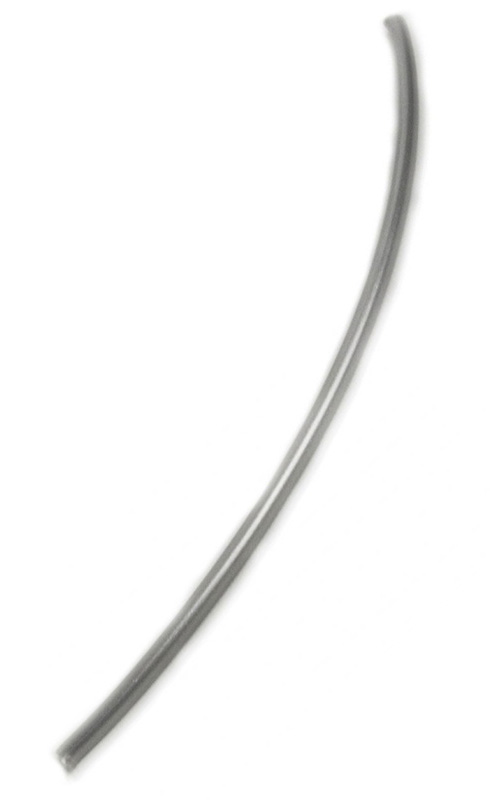
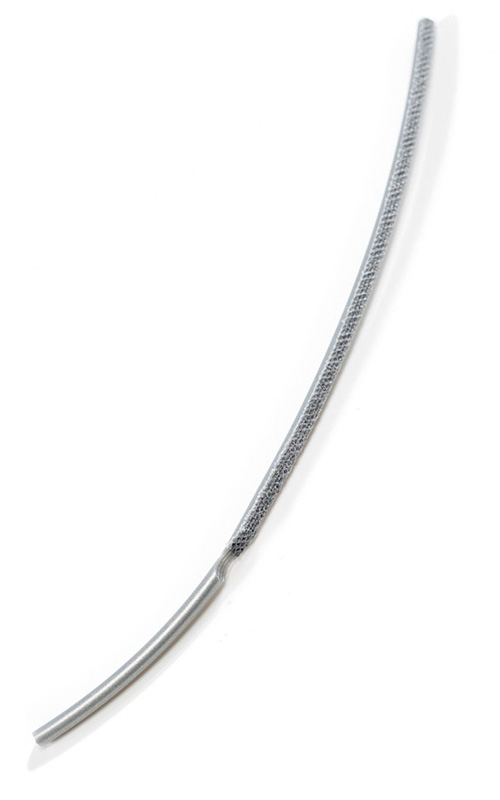
Setting the correct feeder tension is important for good-quality prints. If the tension is too low, the material can slip inside the feeder. If the tension is too high, the feeder can grind into the material and flatten it. If the feeder tension is set correctly, the filament should have clear and consistent marks after passing through the feeder. See the images below.
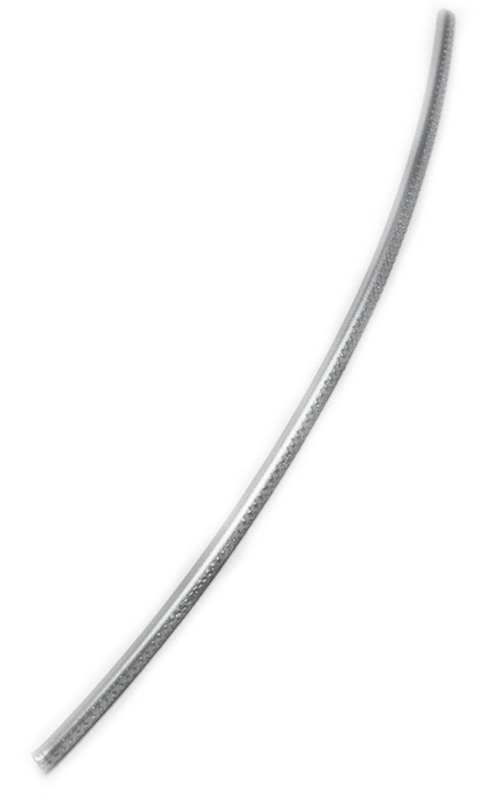 |  |  |
Good
Consistent marks on the filament indicate good feeder tension | Too low
No visible marks on the material indicate too low feeder tension | Too high
Flattened material or grinding indicates too high feeder tension |
For all UltiMaker materials, the feeder tension on the Ultimaker 2, Ultimaker 2 Extended, or Ultimaker 2 Go should be all the way at the top, at its loosest setting. If you are experiencing feeder issues, or using third-party materials, you may have to adjust the feeder tension. See the pages below for instructions:
The Ultimaker 2 Go feeder or The Ultimaker 2 and Ultimaker 2 Extended feeder
The material causes problems
At the end of the spool, the material is usually coiled tightly. In some cases, this can cause the feeder to skip because of friction caused by the curved shape of the filament. In this case, you can try to straighten the material out a bit. If this does not help and the feeder continues to skip, load a new spool of filament.
Another material-related issue concerns the diameter and consistency of the material. Ultimaker materials are made with a controlled extrusion process and tight tolerances to ensure high-quality filament. Third-party materials may not match the same quality standard and this could cause problems. It is important to always check the filament diameter. UltiMaker 3D printers are designed for 2.85 mm filament. Also, inspect the diameter in several locations on the spool to check for consistency. If the diameter varies too much throughout the spool, this is likely to cause extrusion problems.
Extrusion Upgrade Kit
If you continue to experience issues with the feeder ticking or skipping back, consider installing the Extrusion Upgrade Kit for the Ultimaker 2 and Ultimaker 2 Extended. This kit contains a geared feeder for enhanced reliability. Additionally, you will benefit from other features such as swappable nozzles and optimized airflow. Learn more about the benefits on the page below:
The Extrusion Upgrade Kit for the Ultimaker 2
Tip: The Ultimaker 2 series is discontinued and no longer supported. This means that certain unique parts for these printers (such as print head and feeder components) may no longer be available as spare parts. With the Extrusion Upgrade Kit, your printer is officially a + series, so you can benefit from an additional service period.


