The information in this article applies to UltiMaker S series printers: UltiMaker S3, S5, S6, S7, and S8.
This article includes information about materials compatible with UltiMaker S series printers, including printer and print core compatibility, dual-material combinations, and a comparison between UltiMaker materials and filaments from third-party suppliers.
Material and print core availability
The UltiMaker S series printers support all 2.85 mm UltiMaker materials that are currently available, except UltiMaker PPS CF (only supported on Factor 4). The current UltiMaker filament offering includes the following material types:
- General purpose materials: PLA, Tough PLA, PETG, ABS
- Engineering materials: CPE, CPE+, Nylon, PP, PC, TPU 95A
- Composite materials: PET CF, Nylon CF Slide, PPS CF (Note: PPS CF is not supported on S series)
- Support materials: PVA, Breakaway
Tip: Learn more about the available materials and their properties, find the data sheets, and instructions on how to print, in the UltiMaker 2.85 mm materials section.
The material compatibility strongly depends on the print cores. There are different types of print cores, with different supported combinations with printers and materials.
- Print core AA: This print core is intended for regular (non-abrasive) build materials.
- Print core BB: This print core is optimized for support material (PVA and Breakaway).
- Print core CC: The CC print core is designed for use with composite materials and features a wear-resistant nozzle.
- Print core DD: This print core is specifically intended for Ultrafuse Support Layer material, used in the Metal Expansion Kit. It is only available in select regions and is not compatible with standard UltiMaker materials.
- Print core HT: This is an abrasion-resistant, high-temperature print core. It is currently only compatible with Factor 4 (intended for PPS CF material) and not supported on S series.
- Print core AA+: The AA+ print core is designed for high-speed, high-flow printing with a wide range of (non-abrasive) materials. This print core is compatible with S6 and S8.
- Print core CC+: Featuring a wear-resistant hardened steel nozzle and optimized melt zone, the CC+ print core is engineered for printing abrasive composites at high speeds. This print core is compatible with S6 and S8.
Tip: Learn more about specific print core and material compatibility in this article.
Printer and print core compatibility
Although all S series printers are compatible with all UltiMaker materials listed above, not all print cores are compatible with all printer models, and not all materials can be printed reliably with all nozzle sizes. In the overview below, the S series printers have been divided into two groups: the older generation (S3, S5, and S7) and the later, high-speed generation (S6 and S8).
| Material type | UltiMaker material | UltiMaker S3, S5, and S7
Supported print core(s) | UltiMaker S6 and S8
Supported print core(s) |
|---|
| General use | PLA | AA 0.25, AA 0.4, AA 0.8 | AA+ 0.4, AA 0.25, AA 0.4, AA 0.8 |
|---|
| Tough PLA | AA 0.25, AA 0.4, AA 0.8 | AA+ 0.4, AA 0.25, AA 0.4, AA 0.8 |
| PETG | AA 0.25, AA 0.4, AA 0.8 | AA+ 0.4, AA 0.25, AA 0.4, AA 0.8 |
| ABS | AA 0.25, AA 0.4, AA 0.8 | AA+ 0.4, AA 0.25, AA 0.4, AA 0.8 |
| Engineering | Nylon | AA 0.25, AA 0.4, AA 0.8 | AA+ 0.4, AA 0.25, AA 0.4, AA 0.8 |
|---|
| CPE | AA 0.25, AA 0.4, AA 0.8 | AA+ 0.4, AA 0.25, AA 0.4, AA 0.8 |
| CPE+ | AA 0.4, AA 0.8 (experimental) | AA+ 0.4, AA 0.4, AA 0.8 (experimental) |
| PC | AA 0.25 (experimental), AA 0.4, AA 0.8 (experimental) | AA+ 0.4, AA 0.25 (experimental), AA 0.4, AA 0.8 (experimental) |
| TPU 95A | AA 0.4, AA 0.8 | AA+ 0.4, AA 0.4, AA 0.8 |
| PP | AA 0.25 (experimental), AA 0.4, AA 0.8 | AA+ 0.4, AA 0.25 (experimental), AA 0.4, AA 0.8 |
| Composites | PET CF | CC 0.4, CC 0.6 | CC+ 0.6, CC 0.4, CC 0.6 |
|---|
| Nylon CF Slide | CC 0.4, CC 0.6 | CC+ 0.6, CC 0.4, CC 0.6 |
| PPS CF | Not supported | Not supported |
| Support | PVA | BB 0.4, BB 0.8 | BB 0.4, BB 0.8 |
|---|
| Breakaway | AA 0.4, BB 0.4 | BB 0.4 |
Notes on printer and print core compatibility:
- If a print core is not listed as compatible, there are no available profiles. Printing this material with this print core is likely to fail or cause problems, or it is not a logical combination.
- The print cores listed as 'experimental' can be used (there are profiles in UltiMaker Cura), but may not always give the best results. This can depend on the model type.
- The print core compatibility for S series machines has been updated in Cura 5.11. The AA and CC (non-plus) print cores have been added for the UltiMaker S6 and S8, and the compatibility for Breakaway with the BB 0.4 print core has been added for the S3, S5, and S7.
- The AA+ and CC+ print cores are only supported on the UltiMaker S6 and S8.
- For the S6 and S8, Cura also includes profiles for the CC+ 0.4 print core and CPE+, PC, PET CF, and Nylon CF Slide. These profiles are still available in Cura, but this print core has been discontinued due to reliability concerns. The table above shows the updated supported configurations.
Dual material combinations
For an overview of possible dual-extrusion material combinations on S series printers, see the table below:
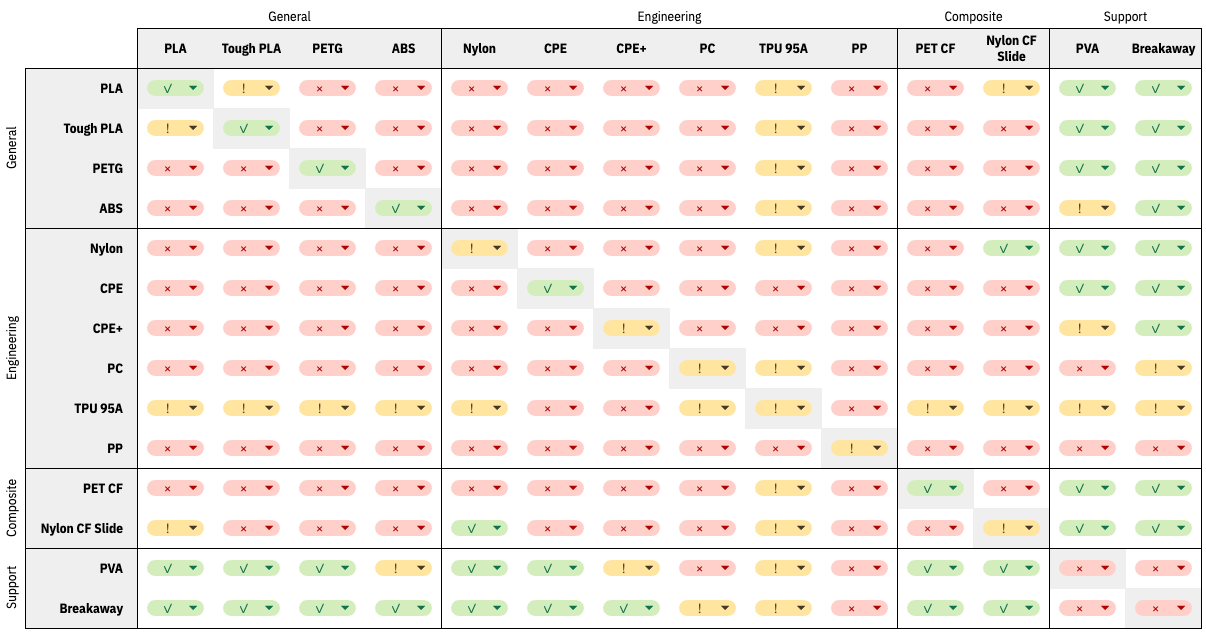
Tip: The icons in the table reflect the compatibility and support of the combination. Officially supported ( ✓ ), not supported ( × ), or experimental ( ! ).
Notes on dual-material combinations
- The not supported combinations have either not been tested (not a logical combination) or are due to chemical incompatibility.
- For the experimental combinations, the results depend on the model type. For more information on why a material combination is listed as experimental, visit the How to print guides of these materials.
- UltiMaker PPS CF is excluded from this overview. Although this material supports some dual combinations, PPS CF is not compatible with the S series printers.
- The material interlocking feature in UltiMaker Cura can greatly improve adhesion between non-similar materials, although results can vary per model.
- For combinations with TPU95A, make sure to pre-dry TPU to limit oozing.
UltiMaker materials vs third-party materials
Although the use of UltiMaker materials is recommended, UltiMaker S series printers have open material systems. You can choose from a wide range of materials to select what works best for your application and workflow.
UltiMaker materials
Using materials from UltiMaker's own portfolio offers the following benefits:
- Profiles: All UltiMaker materials have been tested extensively and have optimized profiles in UltiMaker Cura to ensure the best print result.
- NFC detection: UltiMaker material spools feature an NFC tag, which contains information about the material type and color. The spool holder or Material Station recognizes the filament when a new spool is placed, to facilitate the material loading process.
- Integration: The material information is also directly transferred to UltiMaker Cura and the Digital Factory when the printer is connected via the network. This makes it simpler and quicker to select the right configuration in Cura and streamlines remote print job management.
Tip: The same integration is offered for UltiMaker Certified Materials.
Third-party materials
The UltiMaker S series printers also support third-party materials.
Note: While many different types of filaments can be used on S series printers, note that these printers are only set up for 2.85 mm materials.
Check the UltiMaker Marketplace for compatible material profiles for the best results. You can filter on printer and print core compatibility to ensure you're only finding profiles that match your hardware. Additionally, there are filament-specific filters, such as for characteristics and polymer types, to look for ideal filaments for your application. Add new profiles to Cura via the Marketplace, and sync them to your printer for optimized workflows.
Note: Not all materials are compatible with the Material Station. Always check the Marketplace profiles and the spool dimensions.
If the material type or brand is not available in the Marketplace, you can create custom material profiles manually. Please always carefully check the material and printing specifications with your filament supplier to ensure that you select the right settings in Cura, and that the filament can be printed safely within the limitations of the UltiMaker S series hardware and firmware. Take into account things like temperature (nozzle, build plate, and build volume), diameter / roundness, and the need for ventilation.
Print recommendations
Each material requires different settings for optimal results. If you use UltiMaker Cura to prepare your model, these settings are automatically set correctly if the correct print core(s) and material(s) are selected.
Tip: Always use the latest version of UltiMaker Cura to ensure that you have the most up-to-date print profiles.
- Glass build plate: The UltiMaker S3, S5, and S6 (optional) use a glass build plate. It is recommended to apply a thin layer of glue (using the glue stick from the accessories) or an adhesion sheet to the glass build plate before starting a print. This will ensure that your print adheres reliably to the build plate, and also prevents the glass build plate from chipping when removing materials.
- Flexible build plate: Most materials can and should be printed directly on the (clean) flexible build plate. Preparing the build plate with a spray such as 3DLAC Plus could help improve adhesion if a brim is not used. Only use an additional adhesive such as glue when specifically recommended by the material manufacturer (for a PEI surface).
For detailed instructions on which settings and adhesion methods to use per material, consult the How to print guides per material, or check the page on glue type recommendations.
Depending on the materials used, the number of printers in the room, ventilation, and other factors, the use of the Air Manager can be recommended. The Air Manager filters up to 95% of ultrafine particles (UFPs) generated during the 3D printing the The UltiMaker S7 and S8 have an integrated Air Manager, and the UltiMaker S5 and S6 are compatible with the S series Air Manager add-on.


