A print profile consists of the complete list of print settings and the parameters set, which forms the 3D printing strategy. There are preset profiles in UltiMaker Cura to take away the effort of fine-tuning all available Cura settings. The active profile is shown in the Print settings panel on the right side of the UltiMaker Cura interface.
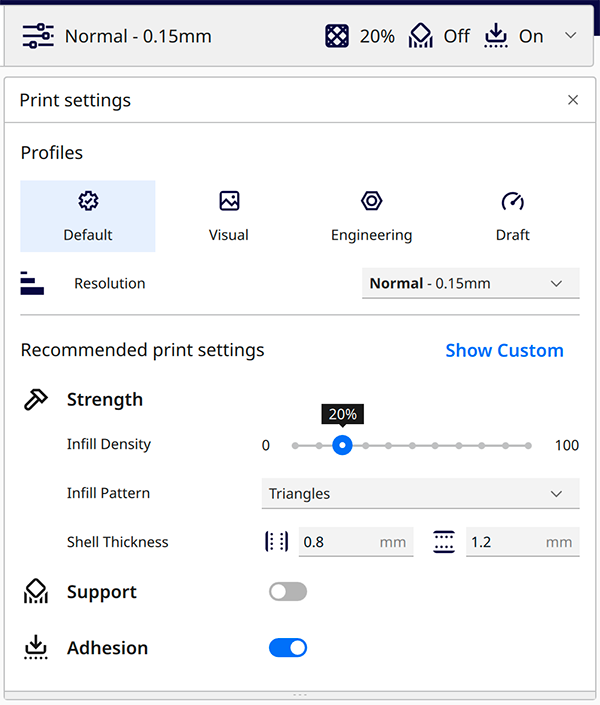
If you want to adjust any print profile settings, you can make quick changes in the recommended mode or create your own fully optimized profiles using the custom mode.
Base profiles
The profiles are usually based on the layer height. For example, the Ultimaker 3 with 0.4 AA and 0.4 BB print cores offers Extra fine (0.06 mm), Fine (0.1 mm), Normal (0.15 mm), and Fast (0.2 mm) profiles.
Note: The availability of print profiles is dependent on the 3D printer, nozzle or print core, and material configuration currently active. If you don't see any available profiles, the configuration is not supported. Learn more here.
Intent profiles
The S series printers also offer intent profiles. These are optimized for application-specific printing strategies. The following intent profiles are available:
- Default. This profile works for general applications and offers a good balance between surface quality and printing time.
- Visual. This profile is intended for visual prototypes and models that require a high visual surface quality.
- Engineering. This profile is intended for functional prototypes and end-use parts with better accuracy and closer tolerances.
- Draft. This profile is intended for quick prototypes and concept validation with significantly reduced print time.
Learn more about intent profiles in this article.
Managing profiles
You can create your own printing strategies using Cura's custom mode. You can learn more about working with custom settings here. If you are happy with the print result and want to save the settings for later, you can save the profile. Access the Profile menu in the Preferences overview. Here, you can create a new profile from your changed settings, import a previously saved profile, or export custom profiles to share with other users.
Learn more about managing print profiles in this article.


