UltiMaker S series printers (S5, S6, S7, and S8) are compatible with the Material Station; this setup is also referred to as the Pro Bundle. In combination with a Material Station, the material is automatically loaded and unloaded, without the interaction of an operator. Factor 4 features an integrated Material Station, with similar automated material handling. To ensure consistent and reliable filament handling, extra procedures have been implemented for the Pro Bundle and Factor 4.
At the start and end of each print job, some material is purged through the nozzle. This is referred to as the prime/deprime procedure. It adds some time to the total print job duration, but it ensures reliable loading and unloading. This fixed routine ensures a reproducible filament tip shape, which is crucial for passing through the complete extrusion train.
This article explains exactly what happens during these procedures and why this is necessary.
Glossary
| Pre-loaded | Materials remain inside the prefeeder of the Material Station when they are not required for a print. |
|---|
| Extrusion train | The combination of components responsible for moving and extruding material. In the S series Pro Bundle, this includes the prefeeders, decouplers, feeders, and print head, all connected with Bowden tubes. In Factor 4, this is similar, except the feeders are in the print head. |
|---|
| Prime procedure | Process for purging the loaded material to ensure the new material is ready for the next print job. |
|---|
| Deprime procedure | Process for purging and unloading the material from the print core after a print job has finished. |
|---|
| Break temperature | The material-specific temperature at which the filament will break off inside the print core before retracting back into the Material Station. |
|---|
| Parked material | After printing, the materials will stay parked above the print head for a certain time. This speeds up loading if a new print is started with the same material. |
|---|
| Rewinding | When the material is fully unloaded back into the Material Station, this activates the rewinder to help the spool turn. Rewinding is done at end-of-filament, or at the end of a print job (when the next job requires a different material or when the parking timer runs out). |
|---|
Tip: For more information about the Material Station components, visit this article for the S series or this article for Factor 4.
Loading material
With the Material Station, all material spools remain in a 'pre-loaded' state. The filament is fed into either entry port 1 or 2 and stays in the Material Station until a material is required for a new print job.
When a new print job starts, the filament is loaded to the print head automatically, without any interaction from the user. Often, print jobs are started remotely via the UltiMaker Digital Factory, and there is no operator near the Pro Bundle.
As the material moves through the various components of the extrusion train (inside the Material Station and the printer), it makes several turns. To ensure that the material can move through smoothly and without friction, it is important that the materials are loaded correctly, and have a nice sharp tip.
Prime procedure
If the previous print was made with materials that have very different properties from the materials required for the next print, such as higher or lower printing temperatures, or contrasting colors, this may cause print quality issues. To prevent these issues, the Pro Bundle or Factor 4 initiates the prime procedure.
The prime procedure ensures that:
- The previous material is purged from the print core.
- The new filament is properly primed and ready for extrusion on the first layer.
During the prime procedure on S series printers, the print head will move to the side of the printer, and material is purged through the nozzle. Extrusion is done in several sequences. In between, the print head moves to a different location; this ensures that the extruded material falls down and does not remain stuck to the nozzle. Doing one single long purge would be faster, but the resulting very long string can get caught around the Z spindle or end up on the print bed.
Note: It is recommended to regularly remove these strands from the inside of the printer. A large accumulation of strands could interfere with the Z motor or Z limit switch and lead to errors such as ER32.
On Factor 4, the priming takes place above the purge buckets, and the nozzle is wiped on the purge rubbers. This helps to keep the inside of the printer clean. Regularly empty the purge buckets and don't forget to reinstall them. If you notice that the purge strings are not neatly collected in the buckets, you may have to recalibrate the purge location. Material strands inside the printer may lead to ER303.
After the prime procedure, the printer will continue with the next step of print preparation: active leveling. Thanks to the prime procedure, the tip of the nozzle will be clean. Therefore, no residual material on the nozzle can interrupt the leveling process or disturb the readings.
Deprime procedure
At the end of a print, or when an end-of-filament has been detected, the Pro Bundle or Factor 4 will initiate the deprime procedure. The goal of this process is to ensure that the material will unload back into the Material Station with a clean tip and no strings.
When a print is finished, or when switching automatically to a new spool, the print head will again move to the side of the printer and purge some material. This purge is to eliminate print job-specific influences, such as retractions, flow rates, or (user-set) temperatures. After this purge, which stabilizes the process, the deprime starts with a material-specific retract, followed by a cooldown period.
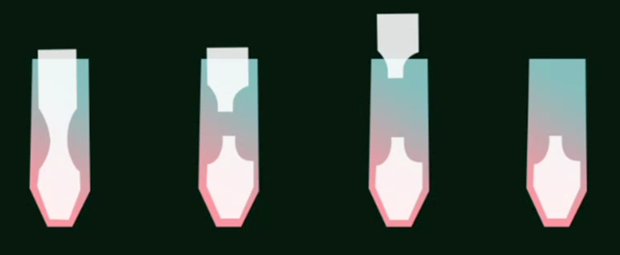
The first step, in which the filament is pulled back a short distance at a high temperature, creates a thin strand of material inside the hot end of the print core. The print core will then cool down to the 'break temperature'. The break temperature is a material-specific property. Upon reaching this temperature, the filament is retracted further, breaking off the solid filament from inside the print core.
For the end-of-print process: The material will then wait in this parked position above the print head for a certain amount of time (2 hours for most materials, but 60 hours for PVA), or until the next print job is started. When the timer runs out, or if the next print job requires different materials, the filament will be fully unloaded back to the Material Station.
For the end-of-filament process: The leftover material will fully unload and rewind back into the Material Station. The printer will automatically detect the next available spool with the same material, load the material to the print head, and continue printing. If no other spool of the same material is available, the printer will remain in a paused state until an operator loads a new compatible spool into one of the material bays.
Material settings
The parameters for the prime and deprime procedure are material-specific. UltiMaker has tested and optimized these parameters for all UltiMaker materials. For third-party materials, the filament manufacturers are responsible for updating their material profiles in the Marketplace. When a material is optimized for the Material Station, the compatibility is shown in the Marketplace. Under Filters, toggle the switch for Material Station compatible.
Note: Not selecting the correct material type may cause issues with the prime and/or deprime procedures, such as failing to unload the material.


