This error message can occur on the UltiMaker S5 or S7 in combination with the Material Station. If you see this error, the Material Station's dehumidifier has failed its self-test.
Explanation
The dehumidifier is located at the back on the inside of the Material Station. It contains several different components that allow it to maintain a low relative humidity for the materials and to self-regenerate. The Material Station will check if all these components are functioning correctly. The ER67 error will show if the self-test has failed.
This error will not interrupt the printing process and can be dismissed, but it is a warning that the Material Station is missing one of its key features: maintaining optimal internal relative humidity. If the humidity rises due to a malfunctioning dehumidifier, the quality of the materials may degrade, especially moisture-sensitive materials such as PVA.
Tip: The Material Station normally aims to keep the internal relative humidity at about 25%. Learn more about humidity control in the Material Station in this article.
Troubleshooting
Try the following in case of an ER67:
- Dismiss the error. The error may be caused by a temporary communication problem. Simply try dismissing the error first.
- Reboot the Pro Bundle. If ER67 reappears, power down the Pro Bundle by disconnecting the power cable from the Material Station. After a few minutes, reconnect the power cable and turn on the printer again.
- Update the firmware. In firmware version 8.1.0, some changes were implemented to reduce the occurrences of ER67. Always ensure to keep your printer's firmware up to date to benefit from the latest features and improvements.
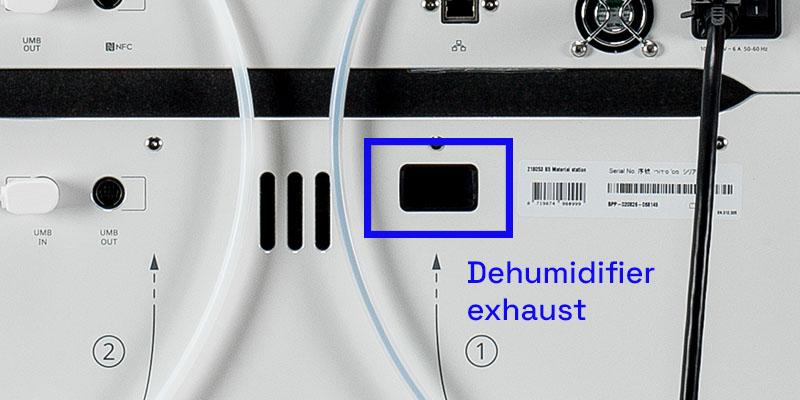
- Check for damage. Especially if the ER67 error occurs on a new machine, or after relocating the Material Station, the dehumidifier and/or exhaust may have shifted. This is not a normal occurrence and would only happen in case of rough transport. Check the back of the machine if the exhaust is still correctly positioned. If it is not, or for more information, please contact support.
- Diagnose. When the error is persistent, there is likely a hardware or connection problem with the dehumidifier or the humidity sensor. The log files provide more information about what is causing the error. Please share the logs with support or your local reseller.
Need further support?
Further troubleshooting requires analyzing the log files and, based on the outcome, performing specific hardware checks on the Material Station. Please contact support for assistance with this error message and include your log files.
Tip: If you have not already enabled this, consider allowing your printer to share anonymous data over the network. This provides valuable insights into internal printer processes and helps UltiMaker improve our products, such as reducing the number of error occurrences.


