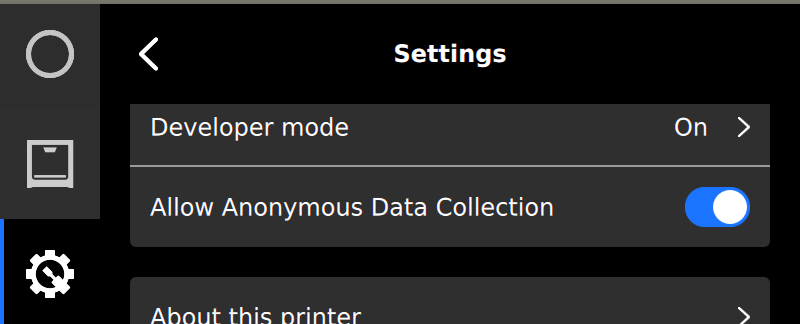
UltiMaker S and Factor series printers have the option to anonymously share data with UltiMaker. Data sharing is available on the following products:
- UltiMaker S3
- UltiMaker S5
- UltiMaker S6
- UltiMaker S7
- UltiMaker S8
- Factor 4
- Factor 4 Plus
Tip: For S series printers, this includes information about any installed peripherals (Air Manager, Material Station, or complete Pro Bundle).
This article explains why data sharing is implemented and how this can affect you.
Why is this needed?
To support ongoing product improvement, UltiMaker S and Factor series printers include an optional feature for anonymous data collection. This feature gathers process-related data about the printer's internal operations, such as the status of running processes and the occurrence of errors. By aggregating this information across all users, UltiMaker gains insights into how printers are performing in real-world conditions. This helps us identify the most common issues and prioritize improvements that bring the most value to users.
Additionally, it allows us to monitor how firmware or software changes affect reliability, providing a clearer measure of the impact of our development efforts.
How does anonymous data sharing affect you?
When enabled, anonymous data collection allows the printer to automatically send diagnostic data to UltiMaker over the internet. This process requires no action from the user and does not affect day-to-day operation or print performance. The primary benefit is long-term: the collected data helps us identify and address issues more quickly, improve product reliability, and proactively prevent potential errors in future software or firmware releases.
What type of data is collected?
Only non-personal, diagnostic information related to the printer's performance is collected. This includes:
- Printer model
- Installed firmware version
- Results of active leveling procedures
- Error reports and internal process diagnostics
This data helps us understand how printers perform in real-world environments and identify recurring issues across devices.
What type of data is not collected?
UltiMaker does not collect any of the following through anonymous data sharing:
- 3D models (e.g., .ufp or .gcode files)
- Personal information
- Geolocation or network-identifying data
Note: If you have concerns about specific types of data or would like clarification about what is collected, please contact UltiMaker support for more information.
Help us make our products even better!
Was this article helpful? Please consider enabling Anonymous Data Collection on your printer and help us develop better products. Anonymous data collection can be enabled via the Settings menu.
Tip: Data sharing is enabled by default, but you can check the Settings menu if it was previously disabled by you or someone else in your organization.
Note: A network connection on your S or Factor series printer is required for data sharing.