The UltiMaker 2+ Connect is compatible with all 10 (non-composite, 2.85 mm) UltiMaker build materials:
PLA, Tough PLA, PETG, ABS, CPE, Nylon, CPE+, PC, TPU95A, and PP.
Note: The UltiMaker 2+ Connect is not compatible with UltiMaker's composite filaments, including PET CF and PPS CF.
Several third-party material profiles for the UltiMaker 2+ Connect are made available via the Marketplace. Read more about third-party material compatibility below.
The UltiMaker 2+ Connect comes with a 0.4 mm nozzle (and a spare). Additional nozzles with sizes 0.25, 0.6, and 0.8 mm can be purchased separately. Material profiles are optimized in UltiMaker Cura for all 4 nozzle sizes and the 10 UltiMaker build materials listed above. The overview below shows which material is compatible with which nozzle size. When a configuration is not supported, reliable print quality could not be achieved. Depending on the material and nozzle combination, different qualities and layer heights are supported.
Compatibility matrix
| | 0.25 nozzle | 0.4 nozzle | 0.6 nozzle | 0.8 nozzle |
|---|
| PLA |
✔
|
✔
|
✔
|
✔
|
|---|
| Tough PLA |
✔
|
✔
|
✔
|
✔
|
|---|
| PETG |
✔
|
✔
|
✔
|
✔
|
|---|
| ABS |
✔
|
✔
|
✔
|
✔
|
|---|
| CPE |
✔
|
✔
|
✔
|
✔
|
|---|
| Nylon |
✔
|
✔
|
✔
|
✔
|
|---|
| CPE+ |
X
|
✔
|
✔
|
✔
|
|---|
| PC |
✔
|
✔
|
✔
|
✔
|
|---|
| TPU95A |
✔
|
✔
|
✔
|
X
|
|---|
| PP |
X
|
✔
|
✔
|
✔
|
|---|
Printing guidelines
Printing profiles for the UltiMaker 2+ Connect can be found in UltiMaker Cura from version 4.8 and above. For detailed instructions per material, we recommend taking a look at the material pages. The material profiles are optimized for good print quality and reliable build plate adhesion and release.
Tip: It is important to carefully level the build plate before printing to ensure good adhesion. Do not level the build plate too tight to the nozzle to avoid extrusion and adhesion issues. For most materials, it is recommended to apply a layer of glue optimized for the printing material.
Third-party materials
Third-party material profiles for the UltiMaker 2+ Connect are developed by our Material Alliance Partners and gradually added to the UltiMaker Marketplace. The compatibility of a material profile with the UltiMaker 2+ Connect is visible on the UltiMaker Marketplace when using the Printer type filter.
Tip: Marketplace materials that are optimized for the UltiMaker 2+ Connect can be installed on the printer menu. Navigate to Set material → Add a new material → Import material from USB. It scans all UFP files on the USB stick, if a material file within the UFP contains the <machine> UltiMaker 2+ Connect, the material can be installed on the printer. This ensures that the correct temperature is used when loading the filament.
If the material profile is not available in the Marketplace, it is also possible to create material profiles in UltiMaker Cura and load a material as a generic material.
- Select a base material on the touch screen. Based on the selected material, the nozzle temperatures for material loading will be adjusted. Therefore, a low-temperature material can be loaded as PLA, while a high-temperature material can be loaded as PC.
- Create or adjust a material profile using another material as a base profile.
A print with a custom material profile can be sent to the UltiMaker 2+ Connect via Digital Factory (Cloud) and the material can be overwritten after choosing Print anyway.
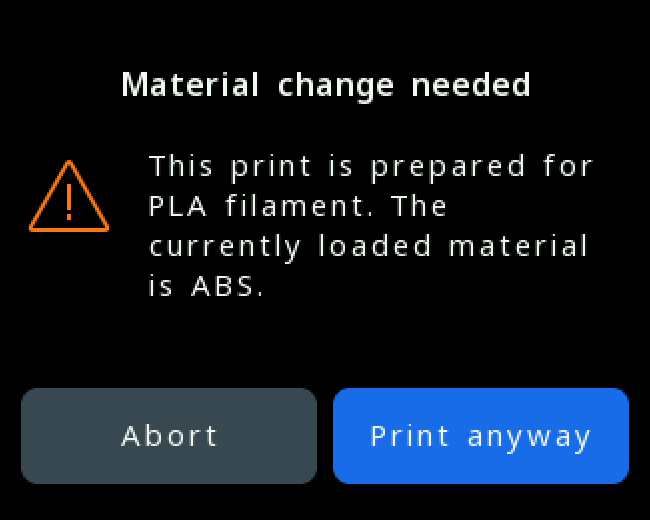
Note: The default generic material profiles are optimized for UltiMaker materials. Make sure your material is compatible with the printer to avoid issues such as grinding or a clogged nozzle.
Hardware limitations
Given the UltiMaker 2+ Connect hardware capabilities, there are a few exceptions of compatible materials to print with:
- The UltiMaker 2+ Connect does not contain a wear-resistant nozzle or a wear-resistant feeder, therefore it is not recommended to print with potentially abrasive materials (including UltiMaker PET CF and PPS CF).
- The UltiMaker 2+ Connect is a single extrusion printer, so no profiles have been developed for dedicated support materials, such as PVA or Breakaway.
- The extrusion path is optimized for 2.85 mm materials and the printer is not compatible with any 1.75 mm filaments.
- The maximum printing temperature of the UltiMaker 2+ Connect is 260 °C.
- The maximum build plate temperature of the UltiMaker 2+ Connect is 110 °C.
Tip: The UltiMaker 2+ Connect Air Manager including the front enclosure is recommended to improve build plate adhesion and release and limit environmental fluctuations.


