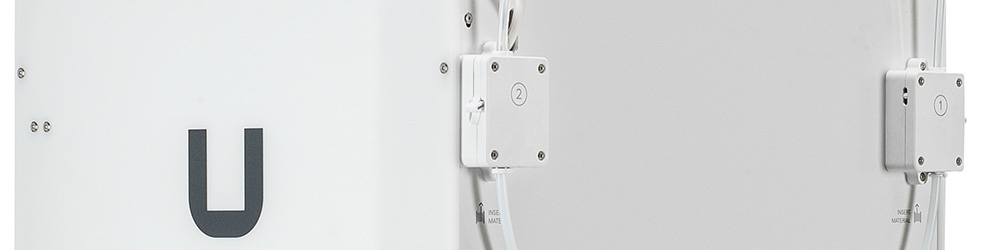
The information in this article applies to UltiMaker S series printers, including the UltiMaker S3, S5, and S7.
There are two feeder versions for the UltiMaker S series printers. In 2020, UltiMaker introduced the fine knurl feeder. This is an updated version of the S series feeder which features a knurled wheel with a finer pattern. This feeder was implemented to improve the reliability of the UltiMaker S5 Pro Bundle when using PVA.
This feeder became the new default part on the UltiMaker S5, later also for the UltiMaker S3, and has been the standard part for the UltiMaker S7 since this product was launched.
Both the older and newer feeder versions were set up as service parts. The older feeder types will remain available while supplies last, but no new parts with this knurl pattern will be produced. If these versions are out of stock, they can be replaced by the newer, fine-knurl type. If a feeder needs replacement, it is important to note which type is currently installed on your printer, as both feeders must be the same type.
What are the benefits of the different versions?
The fine knurl feeders are mainly an improvement on the UltiMaker S5 or S7 Pro Bundle when printing with PVA. The finer pattern is gentler on more brittle materials, reducing the number of breakages, improving uptime, and productivity.
There are no direct benefits, but also no negative effects of the fine knurl feeder on the print quality or reliability of a standalone UltiMaker S5 or the UltiMaker S3. Therefore, this newer version was implemented as the common part on all UltiMaker S series printers.
Which feeder do I have?
The feeder versions look identical from the outside. However, there are several ways to know which feeder type you currently have. Firstly, you can check your serial number.
| UltiMaker S3 |
For UltiMaker S3 printers manufactured in the United States:
- Before BPP-036434 = coarse knurl feeder
- Starting with and above BPP-036434 = fine knurl feeder
For UltiMaker S3 printers manufactured in the Netherlands:
- Before BPP-038008 = coarse knurl feeder
- Starting with and above BPP-038008 = fine knurl feeder
|
|---|
| UltiMaker S5 | For UltiMaker S5 printers manufactured in either location:
- Before BPP-030368 = coarse knurl feeder
- Starting with and above BPP-030368 = fine knurl feeder
|
|---|
| UltiMaker S7 | All UltiMaker S7 printers were manufactured with the fine knurl feeders. |
|---|
Please note that checking the serial number does not guarantee the feeder type; the feeders may have already been replaced before. There are two ways to know for sure: by visually checking the knurl pattern or by checking the log files.
Visual check
You can open the feeder to check the pattern on the knurled wheel. You will need to remove the front part of the feeder housing, as when cleaning the feeders. Reduce the feeder tension and remove the Bowden tube before proceeding. Use the hex screwdriver to remove the four bolts that secure the feeder housing and pull away the front part. Check the pattern on the knurled wheel:
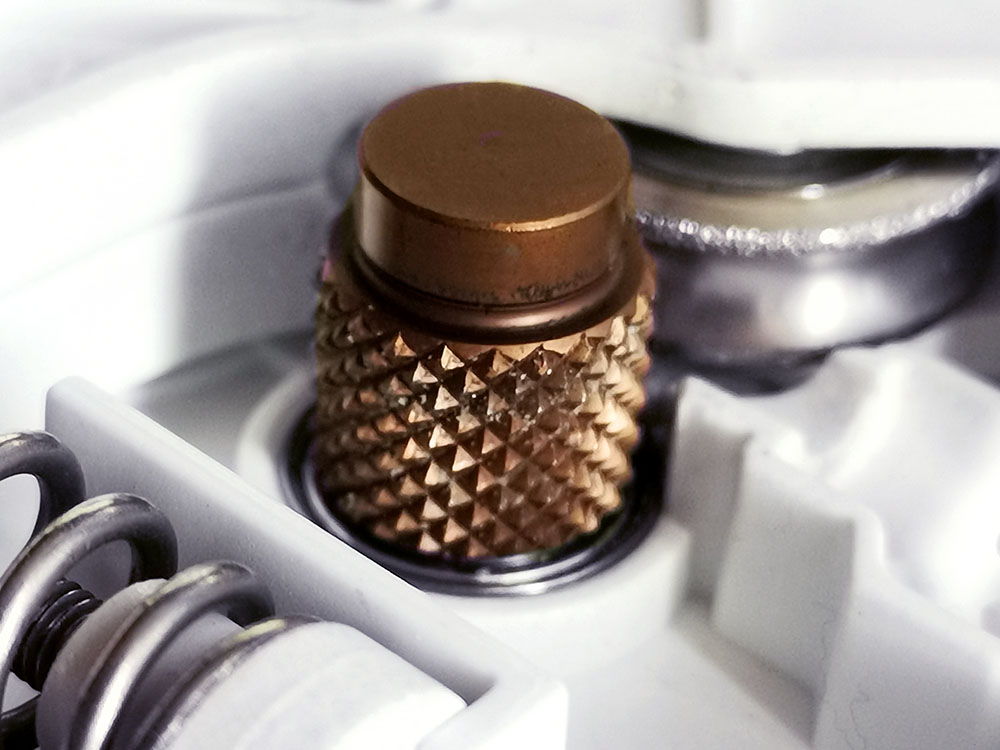 | 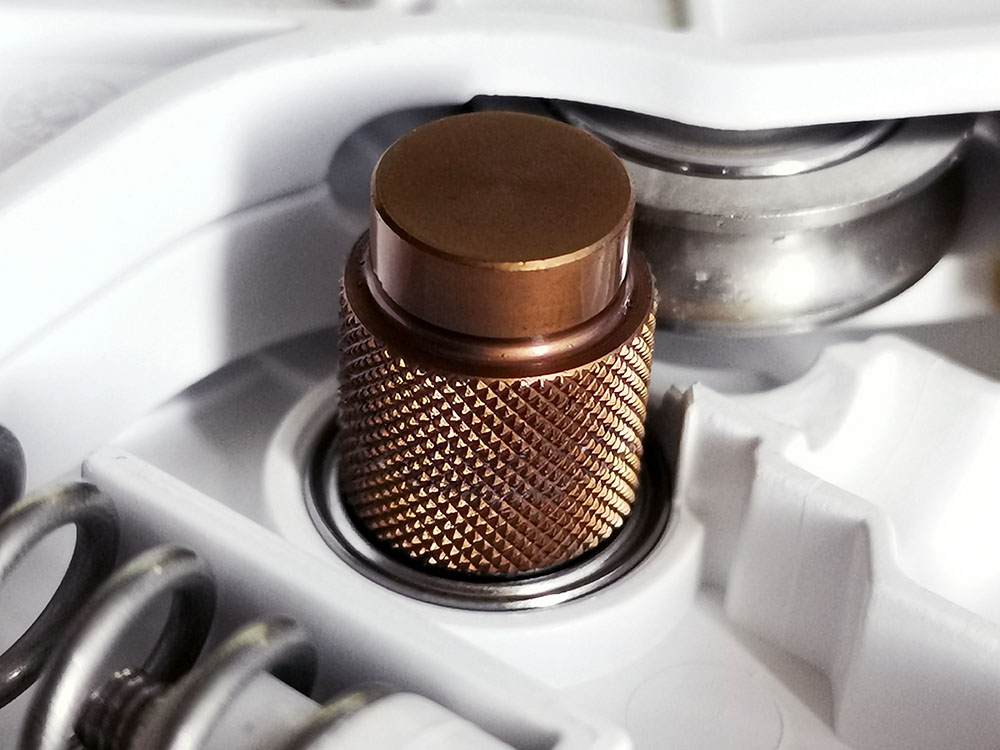 |
| Coarse knurl feeder type | Fine knurl feeder type |
Log files
The feeder version is shown in the log files of your printer. Save your logs to a USB drive, unzip the file on a computer or laptop, and open one of the log files (boot.X.log). Simply look (use Ctrl/Cmnd + F) for the word 'Detected'.
- The earlier 'coarse knurl' feeder will show Detected feeder version 1
- The newer 'fine knurl' feeder shows as Detected feeder version 2
Always ensure you have identified the correct feeder type before replacing one of the feeders. If you need additional help with determining your feeder types, please contact support and attach your log files.
Which feeder(s) do I need?
As mentioned above, the older feeder types will still be available as spare parts while supplies last. Both feeder types are compatible with all S series printers, but both feeders must be of the same type on one printer.
Note: The older feeder types are phased out. Replacement feeders can only be delivered while supplies last. No additional feeders of the old type will be produced anymore by UltiMaker.
Select your printer and check which scenario applies to you:
Tip: If the accordions do not expand when you click on them, please refresh the page.
UltiMaker S3
Old feeder type
If you have an UltiMaker S3 with the older feeder types installed, you can replace just one of the feeders when necessary with the older feeder type, as long as these parts are available. The part numbers are as follows:
- 203732 Feeder assembly left (1) coarse knurl
- 203733 Feeder assembly right (2) coarse knurl
If these parts are no longer available, you will need to replace both of the feeders for the fine knurl feeder type. The part numbers are as follows:
- 225720 Feeder assembly left (1) fine knurl
- 225719 Feeder assembly right (2) fine knurl
- 225984 Fine knurl feeder kit (set containing both the left and right fine knurl feeders)
New feeder type
If you have an UltiMaker S3 with the fine knurl feeders already installed, you can replace just one of the feeders when necessary with the fine knurl feeder version. The part numbers are as follows:
- 225720 Feeder assembly left (1) fine knurl
- 225719 Feeder assembly right (2) fine knurl
UltiMaker S5
Old feeder type
If you have an UltiMaker S5 with the older feeder types installed, you can replace just one of the feeders when necessary with the older feeder type, as long as these parts are available. The part numbers are as follows:
- 203732 Feeder assembly left (1) coarse knurl
- 203733 Feeder assembly right (2) coarse knurl
If these parts are no longer available, you will need to replace both of the feeders for the fine knurl feeder type. The part numbers are as follows:
- 225720 Feeder assembly left (1) fine knurl
- 225719 Feeder assembly right (2) fine knurl
- 225984 Fine knurl feeder kit (set containing both the left and right fine knurl feeders)
New feeder type
If you have an UltiMaker S5 with the fine knurl feeders already installed, you can replace just one of the feeders when necessary with the fine knurl feeder version. The part numbers are as follows:
- 225720 Feeder assembly left (1) fine knurl
- 225719 Feeder assembly right (2) fine knurl
UltiMaker S5 Pro Bundle
Old feeder type
If you have an UltiMaker S5 Pro Bundle, or an UltiMaker S5 in combination with a Material Station, and you use PVA or other brittle materials, the new fine knurl feeder versions are highly recommended for enhanced reliability. If you still have the older feeder types on your Pro Bundle, please contact support to enquire about the Fine knurl feeder kit .
Tip: If you submit valid data (serial numbers of your UltiMaker S5 and Material Station) you may be eligible to receive a Fine knurl feeder kit free of charge, regardless of your warranty status.
New feeder type
If you have an UltiMaker S5 Pro Bundle, or an UltiMaker S5 in combination with a Material Station, with the fine knurl feeders already installed, you can replace just one of the feeders when necessary with the fine knurl feeder version. The part numbers are as follows:
- 225720 Feeder assembly left (1) fine knurl
- 225719 Feeder assembly right (2) fine knurl
UltiMaker S7
The default feeder on the UltiMaker S7 is the fine knurl version. If one or both of the feeders need to be replaced, you can order the following number(s):
- 225720 Feeder assembly left (1) fine knurl
- 225719 Feeder assembly right (2) fine knurl
- 225984 Fine knurl feeder kit (set containing both the left and right fine knurl feeders)


