When using BASF Forward AM Ultrafuse® 17-4 PH and the Ultrafuse® Support Layer on your UltiMaker S series printer, it is important to adjust the feeder tension.
Note: This is only required on S series. Factor 4 does not have adjustable feeders.
Adjusting the feeder tension is critical for these materials because:
- The default feeder tension (indicator in the middle) can cause grinding of the filament and potentially damage the hardware components.
- A too-low tension (indicator too far to the top) can cause an inconsistent flow of the material.
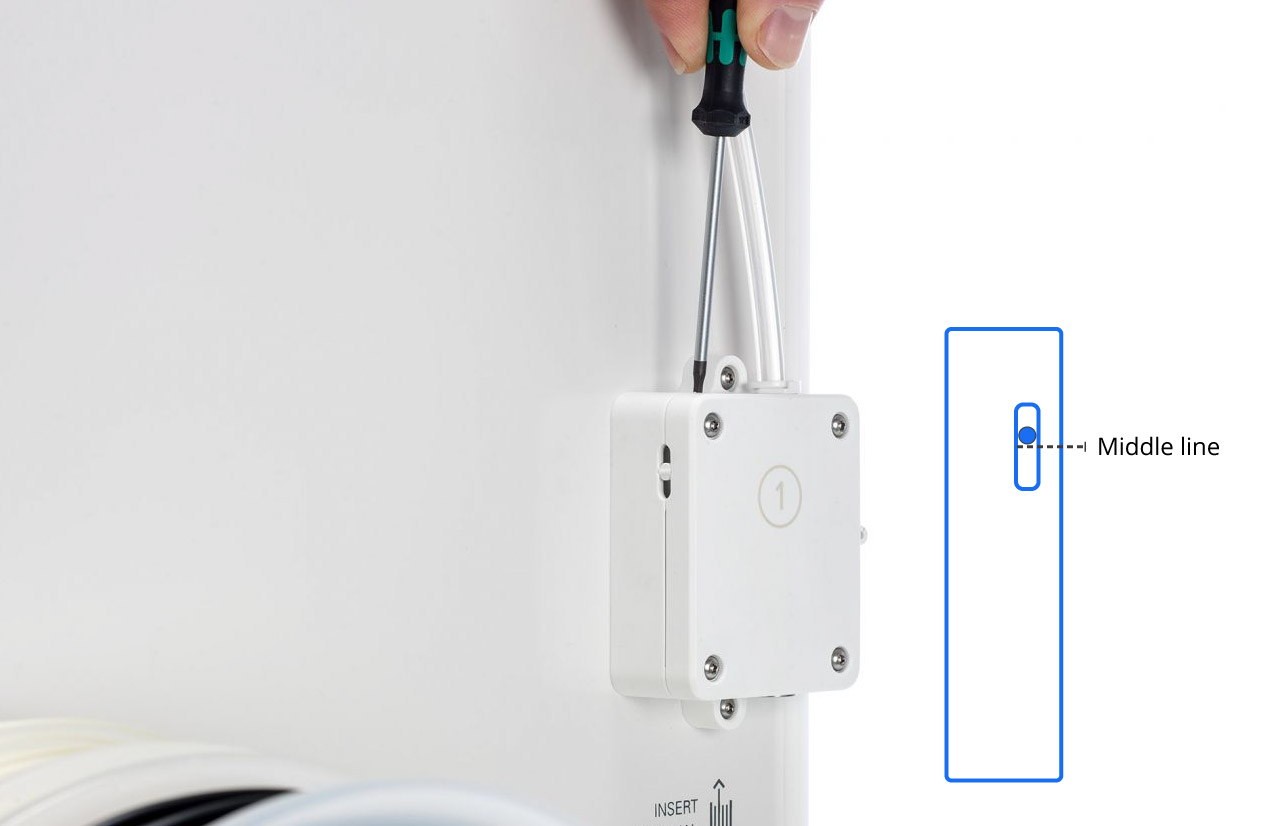
The optimal feeder tension setting for Ultrafuse® 17-4 PH and Ultrafuse® Support Layer is when the tension indicator is in the top half, slightly above the middle. See the image below for clarification. Use the 2 mm hex screwdriver or a hex key to turn the bolt in the top of the feeder housing until the indicator is in the desired position.
Tip: For more information about the feeder tension and how to adjust it, please visit this page.
Tip: Remember to adjust the feeder tension back to default when switching to a different material.


