UltiMaker Cura is compatible with all UltiMaker 3D printer models and offers a wide range of preset third-party printers to select from. If your specific printer type is not present, if you have installed custom modifications, or the printer setup needs adjustment in any way, adding a custom printer might be the solution.
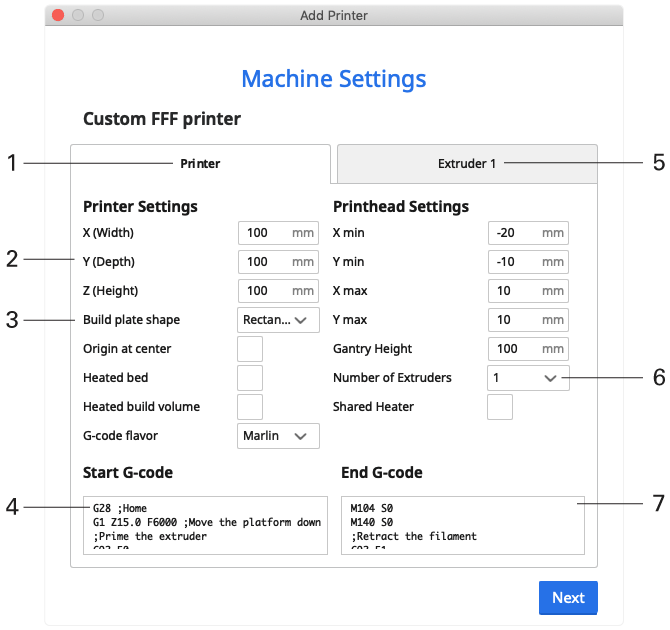
Custom printers are loaded with an empty machine profile, leaving all parameters to be manually adjusted. The image below shows an overview of the available settings and a rough guide on how to handle them.
Adding a custom printer can be done during the welcome setup after installing UltiMaker Cura for the first time, or you can add more printers later at any time by clicking on the Printers panel in the main interface.
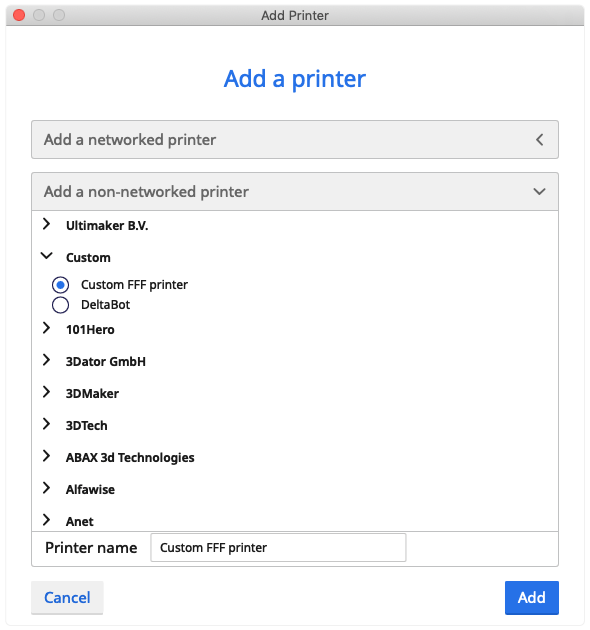
From the list of non-networked printers, scroll down past the UltiMaker models. Select Custom, give the printer a name, and click Add to continue.
Caution: Custom printer configurations and their effects are not tested. Please use the parameters carefully as Ultimaker is not responsible and does not provide support for third-party printers.
- Printer tab. Contains all the general information about the printer. The extruder tab(s) contain extruder-specific information.
- Build plate dimensions. These are used to calculate the maximum dimensions for printed models.
- Build plate. Set the build plate parameters for the shape, heater, and heated build volume.
- Start G-code. This code runs before every print job. It contains moves to home the print head, extrude some material, and more.
- Print head settings. The print head dimensions are used to calculate the exact nozzle position and prevent the print head from hitting the printer's frame or already printed objects on the build plate.
- Number of extruders. Every extruder loaded is represented by its own tab.
- End g-code. This code runs after every print job. It contains code to move the head back to the home position and cooldown both the build plate and nozzle(s).