The UltiMaker S Series Air Manager is designed to increase user safety; it removes up to 95% of ultrafine particles and shields users from hot and moving components.
The Air Manager is an optional add-on for the UltiMaker S5 and S6, and an integrated feature on the UltiMaker S7 and S8. Although the two versions physically differ from each other (the add-on includes a transparent hood while the integrated version is part of the frame), the core components, such as the fan, filter, and electronics, are the same.
This article contains information about how the S Series Air Manager works and what to take into account when printing with the Air Manager.
Note: The information in this article only applies to the S Series Air Manager and is not relevant for other air management and filtration systems for UltiMaker or MakerBot products.
Air Manager operation
Any time a print core or the heated bed exceeds a temperature of 50 °C, the fan of the Air Manager will turn on. At these temperatures, residual material on the build plate or in the print cores can emit UFPs, which should be filtered. Therefore, it is normal for the fan to spin during other operations that require heating, and not only during printing.
After finishing a print, the Air Manager will continue working until both print cores and the build plate have cooled down to below 50 °C. This ensures that the filter captures all residual UFPs in the chamber. When a print has finished, wait until the printer has completely cooled down and the fan has stopped spinning before opening the doors to remove the print.
Caution: Ensure there is at least 10 cm of free space at the back of the Air Manager for unrestricted airflow.
Fan settings
The S Series Air Manager has a variable fan speed. Three parameters influence how the Air Manager works:
- Build volume temperature
- Build plate temperature
- Ambient temperature
When printing with UltiMaker materials, the build volume temperature is preset by the material profile. Many Marketplace materials also have profiles optimized for the S Series Air Manager.
It is not necessary (and therefore also not possible) to list the Air Manager as an add-on for your UltiMaker S5 or S6 in UltiMaker Cura. The correct settings for the Air Manager will automatically be included when slicing your model. The same files can be printed on, for example, an UltiMaker S5 with and without Air Manager.
Build volume temperature
The Air Manager maintains the internal temperature of the printer at the desired Build Volume Temperature. The Build Volume Temperature is a setting within UltiMaker Cura.
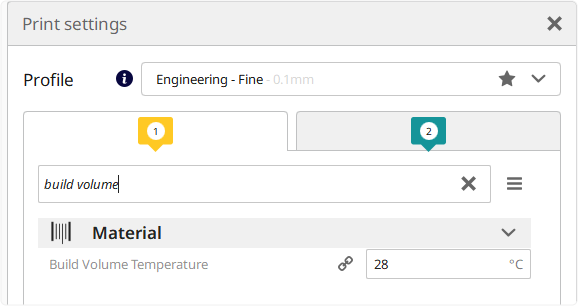
Tip: Use the search function to quickly find the build volume temperature setting. For the best results, always use the latest version of UltiMaker Cura.
The Air Manager adjusts the fan speed to maintain the specified chamber temperature. The fan speed is calculated depending on the build plate temperature as well as the ambient temperature, measured by the Air Manager's own temperature sensor.
Note: When slicing using a very old version of Ultimaker Cura, or any other slicer which does not have a value for the build volume temperature, the Air Manager will default to 100% fan speed.
Note: The build volume temperature has a maximum value of 50 °C to prevent damage to the printer.
The filter
The Air Manager uses an E10 filter. The lifespan of this filter is 1500 hours, and the S Series printer tracks the usage time of this filter. Usage time is whenever the Air Manager fan is active.
There are three filter states:
| Filter state | Shown when | Usage hours |
|---|
| Peak performance | < 90% lifespan | Up to 1350 hours |
| Replacement near | Between 90% and 100% lifespan | Between 1350 and 1500 hours |
| Replacement advised | > 100% lifespan | More than 1500 hours |
Furthermore, the S Series printer can detect whether a filter is present or not.
To replace the filter, use the filter replacement wizard found in the Maintenance section of the printer. Using the wizard will reset the filter lifetime counter back to zero. Visit this page if you want more detailed instructions on how to replace the filter: UltiMaker S Series Air Manager - Replace the filter
Tip: The filter hours can also be manually set back to 0 using the Reset option if the filter was replaced without using the replacement wizard.


