The hot end isolator connects the separate parts of the hot end. It is important that the hot end isolator is properly screwed onto the heater block to prevent any material from gathering between these parts. If material does gather between these parts, it can lead to print quality issues or blockages.
 |
Where is the hot end isolator?
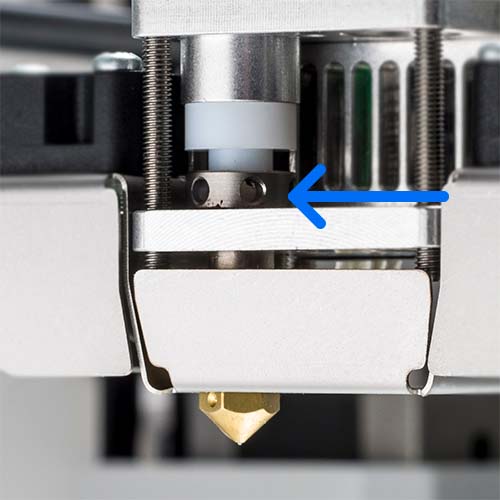
The hot end isolator in the print head is the metal part with holes. This part is between the aluminum plate and the TFM isolator coupler.
Maintenance
It is recommended to retighten the hot end isolator every three months to ensure the parts are connected securely.
|
Caution: This procedure requires heating up the nozzle. Be careful and do not touch the hot nozzle with your bare hands. Protective (thermal) gloves are advised. Ensure the UltiMaker 2+ Connect is disconnected from the Digital Factory or made unavailable for new print jobs.
Instructions
| 1. Retract material | Start by retracting the material. For this, the nozzle must be heated up. You can do so via the Materials → Unload material menu, or via Maintenance → Set nozzle temperature. Open the feeder lever and pull the filament back. The material only has to be retracted until the tip is visible in the Bowden tube above the print head. |
|---|
| 2. Heat up the nozzle | Next, navigate to Maintenance → Set nozzle temperature and use the controls to set the target temperature to 150 °C. |
|---|
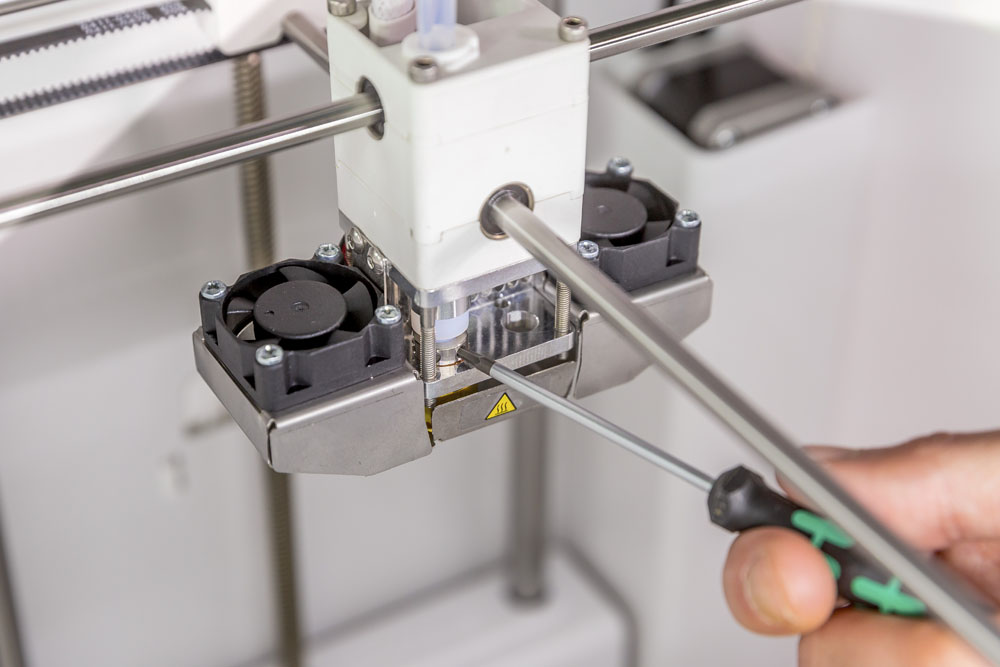
| 3. Tighten the isolator | Insert the 2 mm hex screwdriver into one of the holes of the hot end isolator. Turn the screwdriver clockwise to fully tighten the hot end isolator. |
|---|
| 4. Reload material | Push the material back into the print head until it reaches the nozzle. When you feel resistance, or when the material extrudes a little, close the feeder lever again. |
|---|
| 5. Reset temperature | Set the nozzle temperature to 0° C and wait for the nozzle to cool down. |
|---|
Need further support?
If the hot end of your printer shows signs of leakage, or the hot end isolator is damaged in another way, this part (or the complete hot end) may need to be replaced. Please contact support or your local reseller for further assistance.


