Note: This article contains information about the settings removed from UltiMaker Cura 5 compared to the Cura 4 version. This may not reflect the current situation in the most recent UltiMaker Cura release.
Some print settings available in previous versions of UltiMaker Cura are redundant. This is because the new UltiMaker Cura 5 slicing engine deals with these circumstances in a more efficient way. All settings that have been removed are listed on this page, along with a description of what the setting's function was.
Note: If you were searching in Cura for the settings listed below, they can no longer be found. The newly added Cura 5 settings replace them, read all about them in this article.
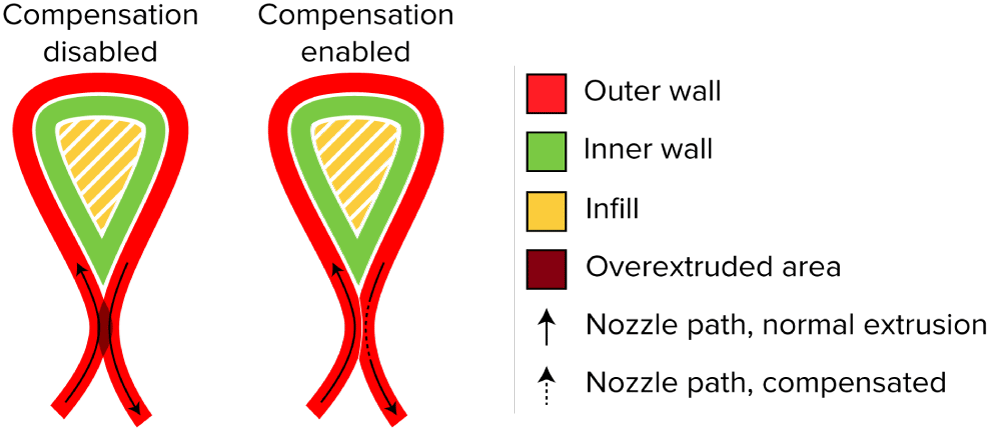
Compensate wall overlaps
With this setting, the extrusion on printed parts is reduced where the print head has to go over a thin area twice. This way, all walls are printed without the part being over-extruded. The setting can be enabled for the outer or the inner walls separately.
Minimum wall flow
Compensating for overlaps in wall lines will reduce the flow rate of some of the walls. This can be problematic, because it can reduce the flow rate arbitrarily low, down to 1% if the walls almost completely overlap. Printing at extremely low flow rates does not work well. It tends to form a droplet pattern instead of continuously extruding lines.
This setting will turn those lines with extremely low flow rates into travel moves, effectively snapping their flow rate to 0%. The material will still ooze out as with normal travel moves, but will not form beads.
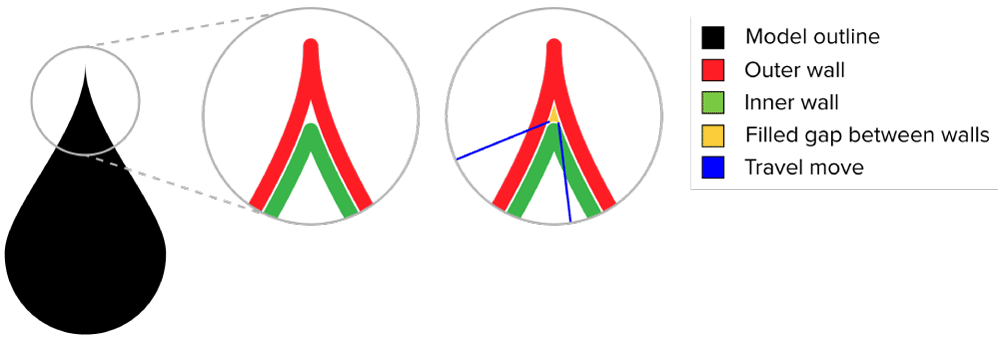
Fill gaps between walls
For fine details, the printer might need to print areas that are thinner than the nozzle size. This can happen between the outer and inner walls where the model ends in sharp corners. This option allows these gaps to be filled after printing both walls. The illustration shows a droplet that has to be printed.
Note: See how the fill gaps option influences the travel moves. The printer has to come back to the gap at later times to fill it.
Filter out tiny gaps
Some gaps between walls are so small that the extra travel path is not worth the extra extrusion to compensate for it. Enable this feature to fill those minuscule gaps anyway, if needed.