UltiMaker places a high value on security. The starting point for UltiMaker's approach to security is to address the risks that our customers are facing. When designing, developing, and maintaining our products & services, UltiMaker takes all justifiable measures to prevent these security risks.
To mitigate these risks and to manage information security in general, UltiMaker follows the guidance of the ISO/IEC 27001 international standard. This standard details requirements for establishing, implementing, maintaining, and continually improving an information security management system (ISMS) – the aim of which is to help organizations make the information assets they hold more secure.
In this document, you will find more details about the risks identified, standards and principles applied, relevant assets, processes used to keep our products secure, and known vulnerabilities. In addition, details are available about the supported security functions in a separate document
Risks
UltiMaker has identified the following core security risks that might affect customers when using our products and services. They are:
- Loss of confidential information such as print files and personal data stored in UltiMaker systems
- Business process interruption, using UltiMaker devices or applications as a stepping stone into customer systems and infrastructure
- Reduction of print quality which could affect customer processes that rely on parts printed via UltiMaker systems
- Unauthorized usage of customer data, products, and services
While UltiMaker has identified only 4 core security risks, there are numerous threats that can obtain, damage, or destroy an asset, resulting in an additional risk to occur. UltiMaker has identified those threats and defined controls to mitigate these related risks.
Standardization
UltiMaker has implemented an Information Risk Management System (ISMS). The main ISO 27001 principles have been used as a starting point for setting this up and UltiMaker has deployed processes that are very similar to those principles.
ISA/IEC 62443-4-2 is the guideline for securing our printers and related software services. This industrial security standard defines specific requirements that are in place to mitigate customers risks.
For those cases where we might not meet all ISA/IEC 62443-4-2 requirements or customer specific security requirements, and where reasonably possible, we will support our customers to take additional measures to meet these security requirements.
Principles for secure design & development
UltiMaker applies the following principles for secure design & development:
- UltiMaker applies the European Machinery Directive 2006/42/EC to comply with health, safety, environment, and availability related constraints.
- UltiMaker printers and Cura desktop software rely on Digital Factory for security functions as both the printer and Cura are open by default. When printing via Digital Factory, the level of security can be increased. More details are available in later sections of this article.
- UltiMaker applies the Principle of Least Privilege (PoLP) in customers functions, but only when printing via Digital Factory (admin, member, and guest users with different levels of authorization). More details are available in later sections of this article.
- UltiMaker has defined a secure development policy covering responsibilities, security related principles, and general software development policies. Application code has been reviewed by at least one other engineer than the original author to ensure quality and lack of vulnerabilities. Furthermore, automated deployments prevent engineers from running application software manually in production without using the proper processes.
Assets
The following assets are available for our customers:
- UltiMaker 3D printers – Machines that turn a digital design into a physical object
- UltiMaker Cura desktop software – Software to create digital designs 3D printers can handle
- UltiMaker Digital Factory – An online service to manage 3D printing workflow
- MakerBot Cloudprint – An online service to manage 3D printing workflow
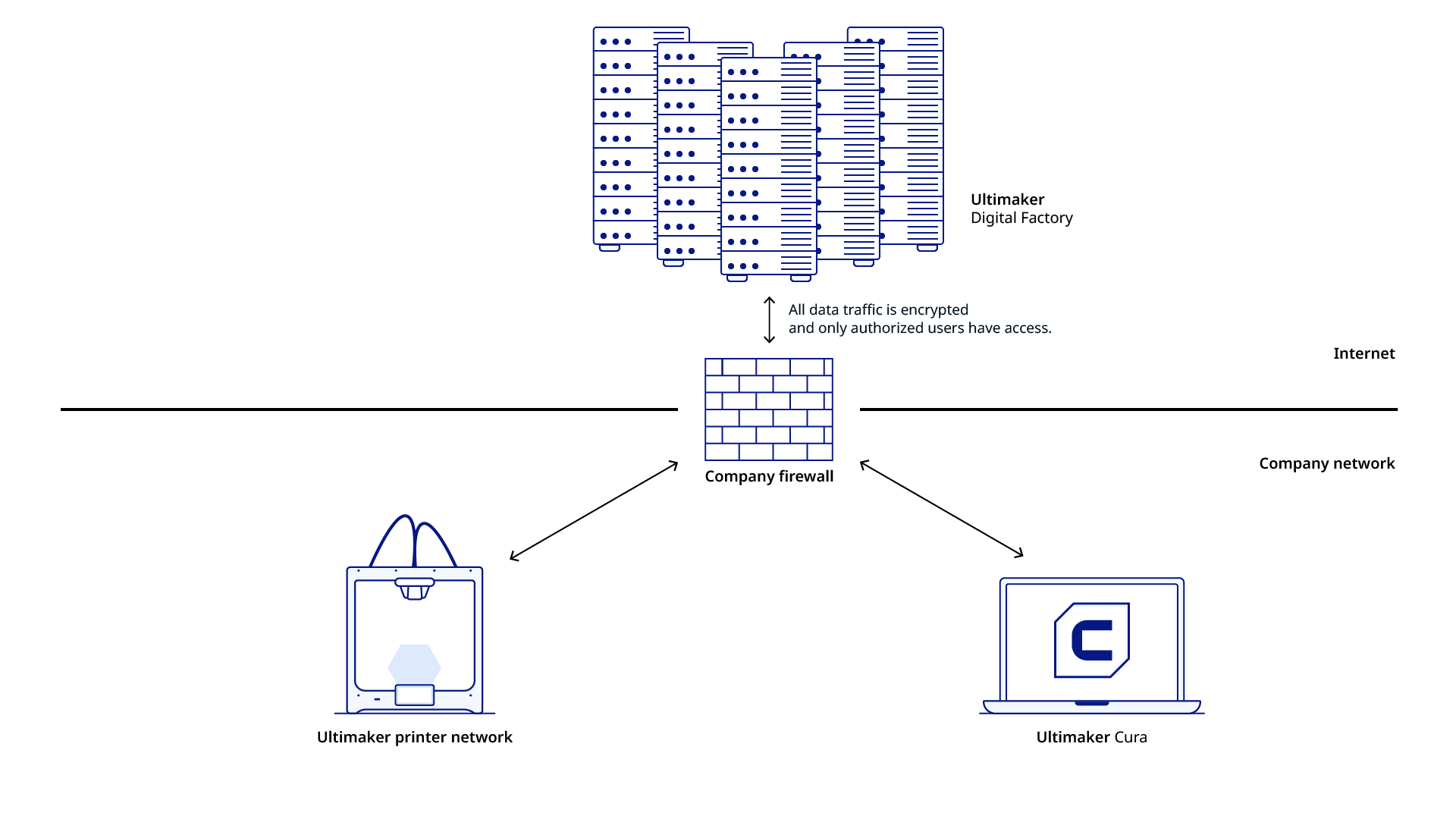
By default –and by design– UltiMaker 3D printers are open. Anyone with physical or network access has full control over the printer. To increase the level of security, you should activate the firewall on the UltiMaker 3D printer and protect your 3D printer settings by using the UltiMaker Digital Factory. Please refer to UltiMaker security functions for more details.
Note: Exception is for the UltiMaker 2+ Connect, which only supports printing via UltiMaker Digital Factory (or USB) and has an active firewall by default.
METHOD and Sketch product lines do not currently support a firewall or restricted access to the printer.
UltiMaker Digital Factory also includes the UltiMaker Marketplace for downloading material profiles and software plugins for the UltiMaker Cura desktop software.
UltiMaker Cura is available in a regular version (for Windows, iOS and Linux) and in an Enterprise version (Windows only, MSI format for distribution across organizations) which is the preferred version from a security perspective:
- UltiMaker Cura Enterprise receives two updates a year. These are based on a recent Cura version that has been thoroughly tested by internal teams and our community to ensure the most stable desktop application. We support updates for 12 months after release, including security patches and critical bug fixes.
- Each release of Cura Enterprise is scanned, tested, and analyzed for vulnerabilities by an independent external party.
- In UltiMaker Cura Enterprise, the UltiMaker Marketplace is only available after authentication and authorization via your UltiMaker account.
- The UltiMaker Marketplace that is accessible through UltiMaker Cura Enterprise contains only validated, security assessed plugins.
- UltiMaker Cura Enterprise fully integrates with the UltiMaker Digital Factory but requires authentication and authorization via an UltiMaker Account.
More details about the security functions supported by UltiMaker products & services in both default mode and with active firewall/settings protection, per the structure provided by ISA/IEC 62443-4-2 are available in UltiMaker Security Functions.
These details should allow you to define to what extent these functions meet your security requirements. In case of any question, please raise a support ticket.
How do we keep our products secure?
Third party security assessments
Products & services are assessed by a third party to validate if the result of our design, development, and maintenance efforts adequately mitigate privacy and security risks. Security assessments are conducted on a recurring basis – at minimum once per year.
The goal of this assessment is to identify potential vulnerabilities in UltiMaker software and services and to provide advice for addressing any potential weaknesses.
Any suggested resolutions – as the result of an assessment – are implemented, with a priority placed on those marked as 'medium' and higher, and also those marked as 'low' that are easy to implement.
General disclosure
At UltiMaker, we consider the security of our cloud platform a top priority. However, no matter how much effort we put into system security, there can still be vulnerabilities present.
If you discover a vulnerability, please let us know as soon as possible via email at security@ultimaker.com. Please do not take advantage of the vulnerability and do not reveal the problem to others. To allow us to resolve the issue, please provide us with sufficient information to reproduce the problem.
Note: UltiMaker does not pay for information about vulnerabilities.
Known vulnerabilities
There are known vulnerabilities for the connection between UltiMaker Cura and printers directly over the local network. Please note the following vulnerabilities are by design and will not be resolved:
The local connection is not encrypted. Customers are recommended to use the UltiMaker Digital Factory to secure the connection between UltiMaker Cura and printers, and also to activate the firewall.
There is no authorization in place. Anyone with access to the same network segment can access the printer web server and APIs. Customers are recommended to use the UltiMaker Digital Factory and to activate the firewall if only authorized users should have access to the printer. As an alternative customers might also apply local mitigation to limit printer access
Similar recommendations apply for CVE-2021-34086 and CVE-2021-34087. Customers using the UltiMaker Digital Factory and with active firewall on their printers are not exposed to these vulnerabilities. Customers might also apply local mitigation to limit printer access.
Customers should at no point expose UltiMaker printers outside of their network firewall.
Please note, UltiMaker does not have the intention to resolve these vulnerabilities as the risk is minimal and the effort required to resolve is significant. Furthermore, adequate mitigation is in place.


